Set Chatbot Confidence Thresholds That Actually Reduce Errors

Use confidence thresholds to route uncertain chatbot turns safely. One practical design has three bands: answer at high confidence, confirm or clarify in the middle, and fall back to a human at low confidence. The numerical cutoffs must be calibrated for your model and traffic. Values such as 0.85 and 0.5 can illustrate the policy, but they are not universal defaults.
Oracle’s intent resolution documentation uses 0.70 as a starting point for its own intent model and recommends testing higher values when results support it. That advice is platform-specific. A threshold that works for one model, domain, or score definition may be wrong for another.
Before changing a threshold, build a representative evaluation set from recent conversations. Label whether each predicted intent or answer was correct, then compare those outcomes with the scores and actions recorded by the system. This gives you evidence for choosing a cutoff instead of relying on a vendor default alone.
- High band (illustrative: 0.85+): bot answers automatically, no confirmation step.
- Medium band (illustrative: 0.5 to 0.85): bot confirms or clarifies before acting.
- Low band (illustrative: below 0.5): bot hands off to a human or triggers a fallback intent.
Pro Tip: Start with enough recent conversations to cover common intents, ambiguous wording, and known failure cases. A smaller, carefully labeled set is more useful than a large sample with unreliable labels.
Key Takeaways
A three-band policy can reduce silent wrong answers by giving ambiguous turns a confirmation path. Its effect on automation and accuracy must be measured with your own labeled conversations.
| Point | Details |
|---|---|
| Start with three bands | Define high, medium, and low actions. Treat 0.85 and 0.5 as examples, then calibrate the actual cutoffs. |
| Calibrate on real data | Label a representative set for correctness, then inspect performance by score band before trusting any threshold. |
| Distrust LLM self-confidence | In RAG systems, evaluate retrieval and grounding signals instead of relying on the model’s stated certainty. |
| Monitor both automation and errors | Watch automation rate and wrong-answer rate together; one rising alone is a red flag. |
| Use grounded, approved knowledge | Deskhero’s AI chat-bot answers only from User-approved public FAQ content and hands off when it cannot answer confidently. |
Table of Contents
- What Is a Chatbot Confidence Threshold, Exactly?
- Why Three Confidence Bands Beat a Single Cutoff
- How Do You Calibrate Confidence Thresholds for Your Bot?
- What Goes Wrong When Thresholds Are Set Badly?
- How Should RAG and LLM Chatbots Handle Confidence Differently?
- What Should You Monitor After Changing a Threshold?
- Copyable Policy Playbooks for Threshold-Based Routing
- What Should You Verify With Your Chatbot Platform?
- How Deskhero Handles Uncertain Chatbot Answers
- What This Guide Gets Right That Most Advice Doesn’t
- Get Deskhero’s Grounded AI Chatbot Working for Your Support Team
- Sources
- FAQ
What Is a Chatbot Confidence Threshold, Exactly?
A confidence score is the number your intent classifier or retrieval system assigns to its best guess, usually somewhere between 0 and 1. A confidence threshold is the line you draw in that range to decide what the bot does next. The score ranks your options; the threshold is the policy decision you layer on top of it.
The meaning of a confidence score depends on the system. Some classifiers output scores that can be calibrated against observed correctness. Other platforms expose only ranking or similarity signals. Do not assume that a score of 0.92 means a 92% chance of a correct answer unless the vendor documents that interpretation and your evaluation data confirms it.
Retrieval-augmented generation (RAG) adds another layer. The generated answer can sound certain even when the retrieved material is stale or irrelevant. Retrieval similarity, source quality, answer support, and model behavior are separate signals. Test each against labeled outcomes before combining them into a routing policy.
Pro Tip: Do not use an LLM’s self-reported certainty as the sole routing signal. Require relevant source material and test whether retrieval or grounding checks actually predict correctness on your data.
Why Three Confidence Bands Beat a Single Cutoff
A single threshold forces a binary choice: answer or do not answer. A middle band adds a third option: ask a short clarifying question. This can reduce silent failures without sending every uncertain turn directly to a human.
| Band | Typical Range | Bot Behavior | UX Example |
|---|---|---|---|
| High | Illustrative: 0.85 and above | Auto-answer, no friction | Bot answers directly: “Your order ships Thursday.” |
| Medium | Illustrative: 0.5 to 0.85 | Confirm or clarify | “Did you mean tracking your order, or canceling it?” |
| Low | Illustrative: below 0.5 | Fallback or handoff | “Let me connect you with someone on our team.” |
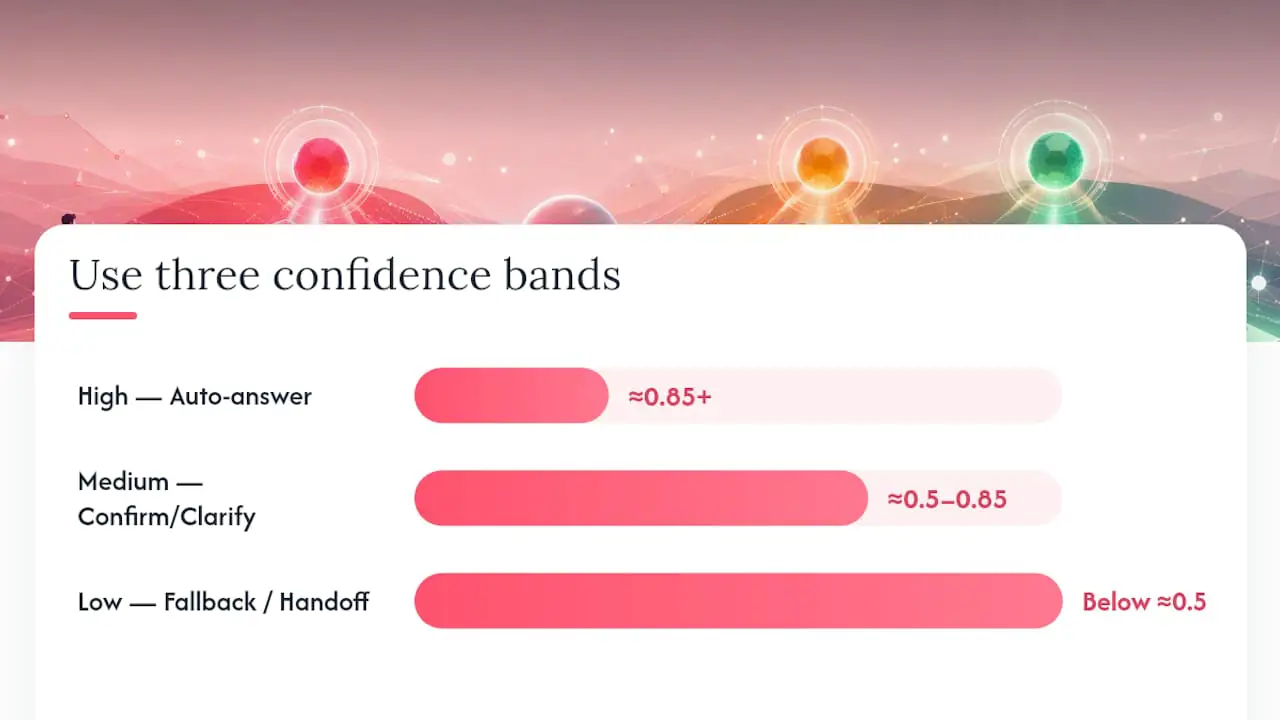
These ranges are examples that make the routing logic concrete. Replace them with values derived from your own platform, score definition, and cost of a wrong answer.
The rationale is simple once you see it in practice. A single cutoff at, say, 0.70 means every score just above that line gets auto-answered with full confidence, even though a score of 0.71 is barely different from 0.69. The middle band gives you a buffer zone where the bot admits some uncertainty instead of pretending it has none.
- Keep confirmation flows short. Tappable choices often reduce ambiguity better than another open-ended prompt.
- Fallback copy should acknowledge the miss without sounding broken: “I’m not confident I understood that, let me get you a person.”
- Measure whether medium-band confirmations resolve the ambiguity or merely add friction.
Here’s the trade-off that stakeholders need to hear plainly: lowering your threshold increases automation rate, but every wrong answer that clears a lowered bar becomes invisible. Nobody flags it because the bot looked confident. Raising the threshold does the opposite, it makes failures visible as fallbacks, which feels worse operationally but is actually safer, because a visible failure gets logged and fixed while an invisible one just erodes trust quietly.
How Do You Calibrate Confidence Thresholds for Your Bot?
Vendor defaults and industry bands are starting points. Your actual cutoffs should come from your own transcripts, because chatbot accuracy levels vary wildly by domain, intent complexity, and how messy your users’ phrasing gets.
- Build a representative test set. Use real questions spanning common intents, ambiguous phrasing, and costly failure cases. The required sample size depends on traffic and the precision you need.
- Label ground truth. For each transcript, mark whether the answer given was actually correct, not just whether the bot sounded confident.
- Map outcomes to scores. Plot confidence score against correctness for every labeled turn. You’re looking for where wrong answers start clustering.
- Compute per-band precision and recall. For each proposed band, calculate what percentage of answers were actually correct (precision) and what percentage of correct answers got through without unnecessary fallback (recall).
- Build a reliability diagram. Bucket predictions by confidence score and plot predicted confidence against observed accuracy. A well-calibrated bot produces a near-diagonal line; a poorly calibrated one bows away from it.
- Calculate Expected Calibration Error (ECE) where possible. This single number quantifies the gap between stated confidence and actual accuracy across all your buckets.
- Run an A/B test before rolling out changes broadly. Split traffic by segment or time window, then compare automation rate, wrong-answer rate, and fallback rate between the old and new thresholds.
Think of it as a pipeline: score distribution flows into band cutoffs, band cutoffs determine action outcomes, and action outcomes get measured against ground truth to check whether the cutoffs were right in the first place.
| Metric | What It Tells You | Tool/Method |
|---|---|---|
| Per-band precision | Share of auto-answered turns that were actually correct | Manual transcript labeling |
| Per-band recall | Share of correct answers that avoided unnecessary fallback | Manual transcript labeling |
| Reliability diagram | Whether stated confidence matches observed accuracy | Bucketed accuracy plot |
| Expected Calibration Error | Single score summarizing calibration gap | Calibration analysis |
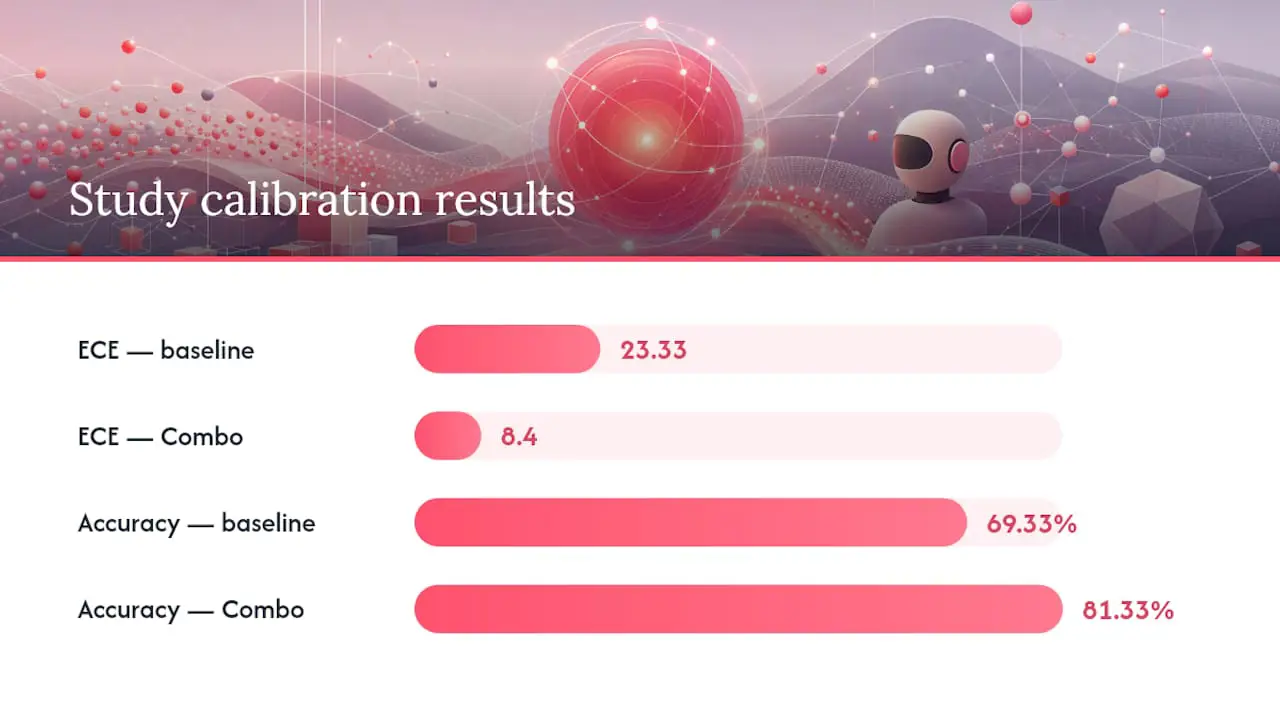
One 2025 study of a RAG-based technical support chatbot reported that its “Combo” prompt strategy reduced Expected Calibration Error from 23.33 to 8.4 while accuracy rose from 69.33% to 81.33%, within that study’s experimental setup. The result is not a universal benchmark, but it shows that prompt and system design can affect calibration as well as the threshold itself.
What Goes Wrong When Thresholds Are Set Badly?
Two failure modes sit at opposite ends of the same dial, and both are common enough that you should know their symptoms cold.
- Threshold too low: the bot auto-answers on weak matches. Some wrong answers may go unreported because the flow never signals uncertainty.
- Threshold too high: the bot escalates questions it could answer correctly, adding delay and reducing the useful automation rate.
- Rising correction events: if users are increasingly rephrasing, correcting, or explicitly saying “that’s not what I asked,” that’s a strong sign your medium band is too narrow or your high band cutoff is too aggressive.
- Mismatch between fallback rate and support ticket volume: if fallbacks are dropping but your support queue is growing anyway, the bot may be auto-answering wrong instead of escalating.
- Feedback flags clustering near your cutoff: if thumbs-down or “not helpful” signals cluster right around your threshold boundary, that boundary is probably in the wrong place.
The fix may be a different cutoff, a wider middle band, better training data, or stronger retrieval and grounding checks. For RAG-backed bots, verify that the retrieved material supports the answer instead of treating a fluent response as evidence. Evaluate a proposed threshold offline on labeled conversations first. If you then run an online test, define safety and rollback criteria before exposing more traffic.
How Should RAG and LLM Chatbots Handle Confidence Differently?
Generative models complicate confidence routing because fluent, assertive prose does not prove that an answer is grounded. A useful policy therefore separates signals such as retrieval quality, citation support, answer consistency, and any classifier score. Each signal still needs validation against actual correctness.
In a multispecialty medical evaluation, 33 physicians across 17 specialties rated answers to 284 questions. The median answer was rated highly, but 36 initial answers received one of the two lowest accuracy scores on a six-point scale. That mix of strong average performance and important failures supports careful validation in high-cost domains. In a separate consumer case, a tribunal held an airline responsible for inaccurate refund information supplied by its chatbot.
Practical patterns that hold up in production:
- Require a relevant source passage for factual answers in workflows where the knowledge base is authoritative.
- Treat an empty or weak retrieval result as automatic low-confidence, regardless of what the language model itself claims.
- Build in an explicit “I don’t know” or escalation path that the model can choose without penalty, since models trained to always produce an answer will produce one even when they shouldn’t.
- Store provenance with the response so a reviewer can check whether the source supports the claim.
Pro Tip: If an answer is supposed to come from an approved knowledge base and retrieval returns nothing relevant, route to clarification or fallback instead of asking the model to improvise.
What Should You Monitor After Changing a Threshold?
A threshold change is not a one-time edit you make and forget. It’s the start of a monitoring window where you watch for the specific signals that tell you whether the change helped or quietly made things worse.
- Automation rate: the percentage of conversations resolved without human involvement.
- Wrong-answer rate: manually labeled from a sample of transcripts, not self-reported by the bot.
- Fallback rate: how often the bot escalates or hands off, tracked over time and by intent.
- Corrections per 100 conversations: how often users rephrase, correct, or explicitly reject an answer.
- Escalation latency: how long it takes a handed-off conversation to reach a human response.
- User satisfaction or CSAT: ideally segmented by band, so you can see whether medium-band confirmations are actually landing well.
Build a dashboard that charts confidence score distribution over time alongside banded outcome rates, and keep a standing sample panel of flagged wrong answers for manual review each week. The single most important correlation to watch: if automation rate is climbing while wrong-answer rate is also climbing, your threshold just moved in the wrong direction, even though the top-line automation number looks like a win. Chatbot performance evaluation only works when you’re tracking both numbers side by side, never one in isolation.
Copyable Policy Playbooks for Threshold-Based Routing
Here’s a policy structure you can adapt directly, along with the telemetry checks that should run automatically after any deployment.
A minimal pseudocode shape for the routing logic:
if confidence >= HIGH_CUTOFF:
    auto_answer(intent)
elif confidence >= MEDIUM_CUTOFF:
    present_confirmation(top_2_intents)
else:
    escalate_to_human()
For the confirmation step, keep the copy tight: “Looks like you’re asking about [X] or [Y]. Which one?” Two tappable choices can turn an ambiguous match into a one-tap clarification. Keep an open-text path available when the choices do not fit.
Before rolling a threshold change to full traffic, validate it offline and then use a controlled test if the platform supports one. Set rollback criteria in advance for wrong-answer rate, fallback rate, and user feedback. A human handoff flow for the low band should preserve the conversation and make the next step clear.
What Should You Verify With Your Chatbot Platform?
Before you flip a production threshold switch on any vendor platform, confirm the platform actually gives you the controls this whole approach depends on.
- Can you read raw confidence scores per turn, not just a binary “matched/didn’t match” result?
- Can you set thresholds per intent or per skill, rather than one global number for the entire bot?
- For RAG configurations, can you access the retrieval similarity score separately from the generation step’s output?
- Does the platform support a “confidence win margin” setting, so close-scoring intents present as options instead of one getting silently picked?
- Can you export full transcripts for offline labeling and analysis, without stripping out the confidence metadata?
- Is there a test mode that lets you run a candidate threshold against historical traffic before it touches live users?
Oracle’s own documentation on tuning intent resolution is a useful reference for what these settings look like in a mature platform, confidence threshold and confidence win margin both show up explicitly as named, adjustable controls. If a vendor can’t answer these questions clearly during procurement, treat that as a warning sign, not a minor gap. You cannot calibrate what you cannot see, and a platform that hides its scores is asking you to trust it blindly.
How Deskhero Handles Uncertain Chatbot Answers
Deskhero does not expose raw chatbot confidence scores or customer-adjustable confidence bands. Instead, its AI chat-bot answers from the workspace’s approved public FAQ and reveals the contact form when it cannot answer confidently. FAQ suggestions can be created from resolved tickets and scraped website content, but a User must approve them before the chatbot can use them.
- Customer-facing chatbot answers use only User-approved public FAQ content.
- When the chatbot cannot answer confidently, it reveals a form so the visitor can contact the team.
- Every chat session becomes a ticket with its transcript, and automatic actions are labeled and logged.
- The chatbot is enabled per widget and requires at least 100 approved public FAQ items.
Pro Tip: Before enabling a support chatbot broadly, test common questions and known edge cases against the approved FAQ. Review both answered and handed-off chat tickets to find missing, ambiguous, or outdated FAQ entries.
What This Guide Gets Right That Most Advice Doesn’t
Most confidence-threshold advice online treats the number itself as the product: find the magic cutoff, set it, move on. That framing is backward. The threshold is downstream of two things that actually matter more, your grounding quality and your labeling discipline, and no cutoff fixes a broken version of either.
The distinction matters most for generative and RAG chatbots. A classifier score, a retrieval similarity score, and an LLM’s stated certainty are not interchangeable. They come from different mechanisms and may have very different relationships with correctness.
Grounding and threshold calibration solve different problems. Relevant source material can reduce unsupported answers, but it does not guarantee that the model will interpret the source correctly. A calibrated routing policy can reduce risky automation, but it cannot repair stale or incomplete knowledge. Validate both the knowledge pipeline and the action thresholds, then focus review on the score ranges where errors and handoffs cluster.
Get Deskhero’s Grounded AI Chatbot Working for Your Support Team
A custom confidence-routing pipeline needs model or retrieval scores, transcript logging, evaluation data, and a human handoff flow. Deskhero takes a managed approach for its AI chat-bot: answer from the approved public FAQ and reveal the contact form when it cannot answer confidently.
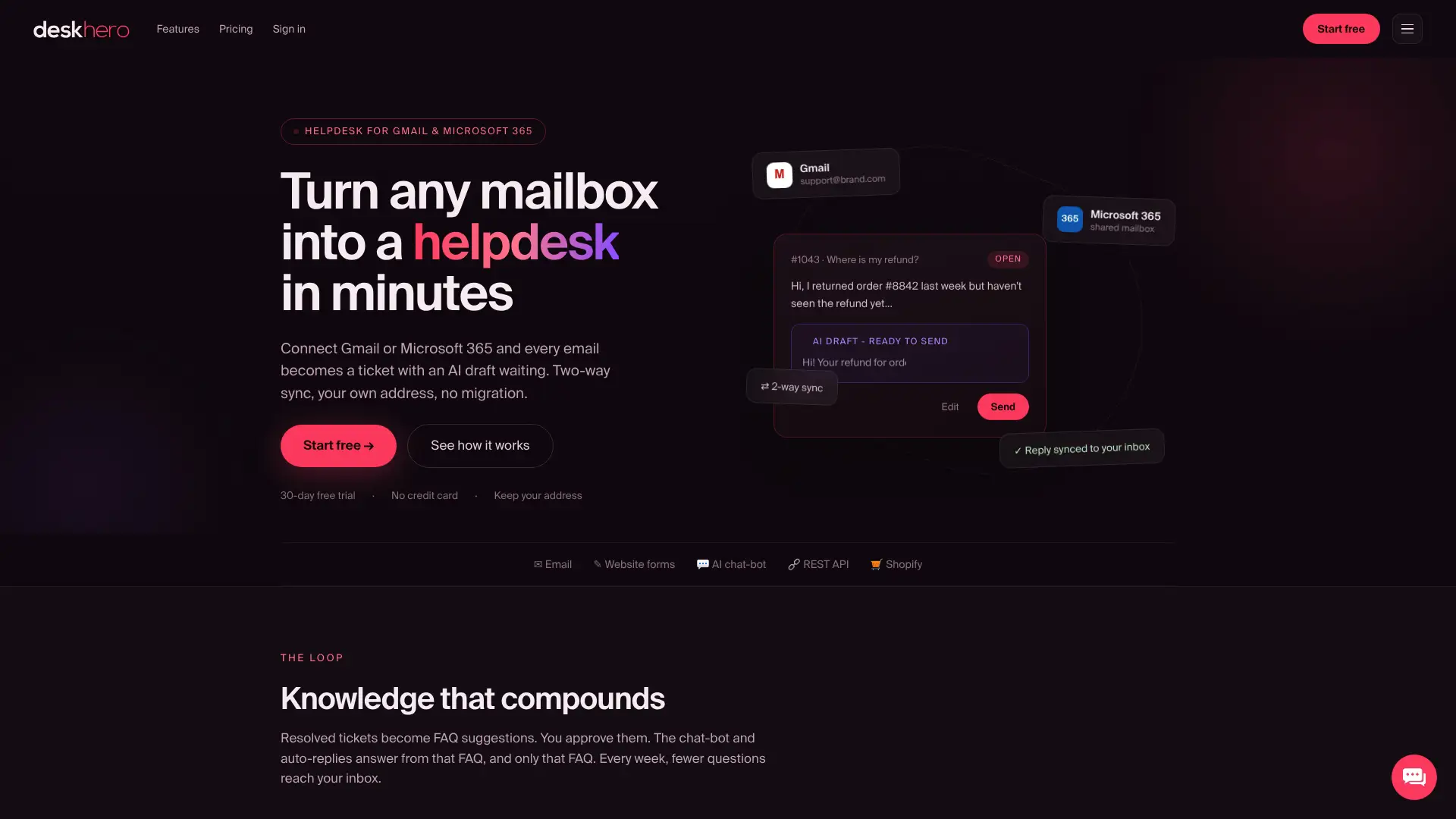
Deskhero connects Gmail, Google Workspace, and Microsoft 365 mailboxes to a shared helpdesk while replies continue to use your company address. Questions arriving by email, an embedded form, or the AI chat-bot become tickets. Deskhero can suggest public FAQ entries from resolved tickets and scraped pages. Once a User approves an entry, both the chatbot and AI auto-replies can use it. For e-commerce teams, the Shopify customer panel displays customer and order context beside the ticket.
Start the 30-day free trial, no credit card required, and run your own 30 to 100 question test set against it before deciding how much of your support volume to automate.
Sources
- Tune intent resolution before publishing
- Optimizing confidence scoring in RAG-based LLM chatbots for technical support services: A prompt engineering approach
- How accurate are AI chatbots in clinical scenarios (peer-reviewed analysis)
FAQ
What Is a Good Confidence Score for a Chatbot?
There is no universal number. A three-band policy might use 0.85 and 0.5 as illustrative boundaries, but those values are not general recommendations. Oracle documents 0.7 as a starting point for its own intent model. Calibrate any cutoff against labeled conversations from the model and platform you actually use.
How Is a Confidence Score Calculated?
For an intent classifier, the score is model-specific and usually indicates how strongly the model favors an intent. It should be treated as a probability only if the platform defines it that way and calibration data supports the interpretation. RAG systems may also expose retrieval similarity, grounding, or answer-validation signals, each of which needs separate evaluation.
What Is the Confidence Score in an LLM-Based Chatbot?
An LLM’s self-reported confidence should not be assumed to predict correctness. For a RAG chatbot, evaluate retrieval quality and whether the answer is supported by the retrieved material. Use those tested signals, rather than fluent wording or stated certainty alone, when deciding whether to answer or fall back.
What Should You Never Tell a Chatbot?
Avoid sharing sensitive personal data, passwords, financial account numbers, or confidential business information with any chatbot unless you’ve verified the specific platform’s data handling and retention policies. This matters even more for support bots that log conversations for training or quality review.
How Do You Verify a Chatbot’s Response Is Correct?
Use a representative sample of real conversations, label whether each answer is supported and correct, and compare those outcomes with the system’s available scores and routing actions. Deskhero narrows the chatbot’s source material to User-approved public FAQ content, but teams should still review answers and handoffs for missing or outdated knowledge.