How to Maintain Chatbot Knowledge: A Practical Playbook

Maintain chatbot knowledge as a recurring, role-based process: audit → update → validate → publish → retire. That five-step cycle, run on a predictable cadence with clear ownership at each gate, is what separates a chatbot that earns customer trust from one that quietly erodes it.
Here is the short checklist your team needs before anything else:
- Source hygiene: Remove outdated, duplicate, or contradictory documents before they reach the index.
- Chunking and indexing: Start with 500 to 1,000 character chunks, then adjust the size based on retrieval tests.
- Retriever tuning: Test and adjust similarity thresholds quarterly so precision stays high as the KB grows.
- Approval workflow: Every new or edited article needs a sign-off before it goes live in the chatbot.
- Monitoring metrics: Track answer quality, unresolved questions, and handoffs on a regular schedule.
- Rollback and versioning: Keep a changelog so any bad update can be reversed within minutes.
Who owns what: Content owners author and update articles. A knowledge steward enforces standards and runs audits. A technical owner handles chunking, embeddings, and retrieval settings when the team manages those components. A reviewer runs test sets before each publish. Compliance specialists review content that covers regulated topics.
Key Takeaways
Maintaining chatbot knowledge requires a repeatable audit-to-retire cycle, clear ownership, and regular monitoring to catch gaps before customers do.
| Point | Details |
|---|---|
| Use the audit-to-retire cycle | Run audit → update → validate → publish → retire on a weekly/monthly/quarterly cadence to prevent KB drift. |
| Test chunk size | Start retrieval chunks at 500 to 1,000 characters and adjust based on test results. |
| Track useful quality signals | Monitor answer accuracy, unresolved questions, handoffs, and confirmed incorrect answers, then define thresholds that fit your service. |
| Assign a knowledge steward | Give one person clear responsibility for the editorial calendar, review queue, and maintenance cadence. |
| Deskhero enforces approved-knowledge answers | Deskhero’s chatbot answers only from approved public FAQ content and suggests FAQ candidates from resolved tickets and scraped website pages. |
Table of Contents
- What is a chatbot knowledge base and how does it power answers?
- Why continuous maintenance matters for chatbot accuracy
- Step-by-step operational playbook to maintain chatbot knowledge
- Standards, templates, and governance that keep answers reliable
- What to measure and how to act on the signals
- Tooling patterns and integration checklist
- How Deskhero maps to this maintenance playbook
- Maintenance cadence, staffing, and cost considerations
- How to validate new knowledge sources before integration
- How to use user feedback to refine chatbot knowledge
- What support teams actually learn running this in production
- Deskhero makes the maintenance playbook operational from day one
- Sources
- FAQ
What is a chatbot knowledge base and how does it power answers?
A chatbot knowledge base (KB) is not just a folder of help articles. It is a curated pipeline: source documents flow through a chunking step, each chunk is converted into a numerical vector (an embedding), those vectors are stored in a vector database, and a retriever pulls the most relevant chunks at query time. The language model then synthesizes an answer from those retrieved chunks, grounded in your actual content rather than its base training data.
Many AI knowledge chatbots use a retrieval pipeline with chunks, embeddings, a vector database, a retriever, and a language model. Systems that retain source references make it easier to inspect an answer and trace it back to the material used.
The core components of a well-built KB pipeline:
- Source documents: KB articles, resolved tickets, PDFs, website pages, policy docs.
- Metadata: Tags for topic, product area, audience, last-updated date, and author.
- Embeddings: Dense vector representations of each chunk, generated by an embedding model.
- Vector database: Stores and indexes embeddings for fast semantic search (Pinecone, Weaviate, pgvector, and similar tools).
- Retriever: Queries the vector DB and returns the top-N most relevant chunks.
- LLM plus system prompts: Synthesizes the retrieved chunks into a natural-language answer, constrained by your instructions.
- Citation layer: Attaches source references to each answer so Users and customers can verify.
Pro Tip: Keep each article focused on one clear topic. Split documents that answer several unrelated questions. Chunk size matters too: start at 500 to 1,000 characters and adjust based on test results. Chunks that are too small can lose context, while chunks that are too large can bury the relevant sentence.
Why continuous maintenance matters for chatbot accuracy
A chatbot trained once and left alone degrades. Products change, policies update, pricing shifts, and the KB silently falls behind. The chatbot keeps answering from stale data, and customers notice before your team does.
Keeping the KB current can improve answer quality and help more customers resolve routine questions without a handoff. Consistent tone and approved phrasing can also reduce avoidable errors. New Users have a clearer reference point when the KB is treated as the canonical source. Results still depend on content quality, deployment scope, and how the chatbot is configured.
The risks of neglect are just as clear:
- Stale answers: A chatbot citing a discontinued product or an old return policy damages credibility immediately.
- Contradictory content: Two articles giving different answers to the same question confuse the retriever and produce inconsistent responses.
- Hallucination risk: When the retriever finds nothing relevant, a poorly configured system invents an answer. A well-maintained KB reduces that gap.
- Compliance exposure: In regulated industries, an outdated policy answer can create serious review and compliance concerns.
- Eroded trust: Customers who get a wrong answer twice rarely give the bot a third chance.
Step-by-step operational playbook to maintain chatbot knowledge
This is a repeatable workflow your team can map to an internal SOP. Set a practical cadence for log review, content updates, and retrieval testing, then adjust it to match how often your products and policies change.
-
Schedule the audit. Pull the previous period’s conversation logs. Flag queries with low confidence scores, escalations, and “I don’t know” fallbacks. These are your highest-priority gaps.
-
Identify missing and outdated content. Cross-reference flagged queries against existing KB articles. Mark articles that reference deprecated features, old pricing, or expired promotions for immediate update or retirement.
-
Author or update canonical answers. Write one article per topic. Use customer-facing language, not internal jargon. Required fields: topic title, scope (which product/plan it applies to), intended audience, author, last-updated date, and approval status.
-
Chunk and embed. Start by breaking updated articles into chunks of 500 to 1,000 characters. Add metadata tags (topic, product, language, audience). Push chunks through your embedding model and load them into the vector database in a staging environment, not production.
-
Run staged validation tests. Use a test set of 20 to 30 real queries drawn from logs. Check that each query retrieves the correct chunk and that the generated answer matches the canonical answer. Set a pass threshold for retrieval accuracy before promoting to production.
-
Push to production with an approval gate. A designated approver (knowledge steward or team lead) reviews the test results and signs off. Log the publish event with a timestamp, author, and version number.
-
Monitor post-publish. Watch answer quality and handoffs closely after any significant update. If a metric drops or reviews find incorrect answers, roll back the change using the version history.
-
Retire stale content. Archive rather than delete so the version history stays intact. Update any articles that referenced the retired content.
Pro Tip: When the platform supports it, require source references for factual answers. Pair that with an explicit fallback instruction: if retrieval returns no sufficiently relevant content, the chatbot should say it cannot answer and offer a human handoff rather than guess.
Pro Tip: Quality beats quantity at every stage. Five to ten well-written, focused documents produce a more capable assistant than fifty loosely structured ones. Prune aggressively before you index.
Standards, templates, and governance that keep answers reliable
Good governance is not bureaucracy for its own sake. A human-centered approach to AI starts with the needs and well-being of the people affected by the system. For a customer-facing chatbot, documented approvals, version history, and change notes make review and accountability practical.
Editorial standards every article must meet
- One topic, one answer. No article covers more than one discrete question.
- Customer-friendly language. Write the way a customer would ask, not the way an engineer would document.
- Required fields: Topic title, scope, audience, author, last-updated date, approval status, version number, and a brief change note.
- No duplicate data. If an ingest pipeline already pulls live pricing from your system of record, do not hardcode that price in a KB article. It will go stale.
- Proactive log review. Review conversation logs on a set cadence to find gaps before customers report them.
Governance roles
- Content owner: Subject-matter expert who authors and updates articles in their domain.
- Knowledge steward: Enforces standards, runs audits, manages the article lifecycle, and owns the editorial calendar.
- Approver: Team lead or manager who signs off before any article goes live.
- ML owner: Handles chunking parameters, embedding model updates, retriever configuration, and test-set maintenance.
- Compliance reviewer: Required sign-off for articles touching regulated topics (pricing, legal terms, data privacy).
Trust signals to implement now
- Audit logs that record every create, edit, approve, and retire action with a timestamp and user ID.
- Version history with diff views so any change is reviewable.
- Changelogs attached to each article showing what changed and why.
- Approval stamps visible in the KB admin so the team can see what is and is not cleared for chatbot use.
- Source citations surfaced in every chatbot answer.
What to measure and how to act on the signals
Monitoring is where maintenance decisions get made. Without metrics, you are guessing which articles to update. With them, you have a prioritized work queue every week.
Key metrics to track:
- Answer accuracy / correctness: Percentage of chatbot responses that match the canonical answer on a sampled test set.
- Grounding rate: Percentage of responses that cite a specific source chunk. A drop here signals retriever drift or missing content.
- Deflection rate: Percentage of conversations resolved without User involvement. Rising escalations often trace back to a specific KB gap.
- Escalation rate: Inverse of deflection; track by topic category to pinpoint which content areas need attention.
- Time-to-update: How long it takes to move from identifying a gap to publishing a verified fix.
- CSAT for bot: Customer satisfaction score specifically for chatbot-handled conversations.
- Hallucination incidents: Count of confirmed cases where the bot produced a factually incorrect answer not grounded in any source.
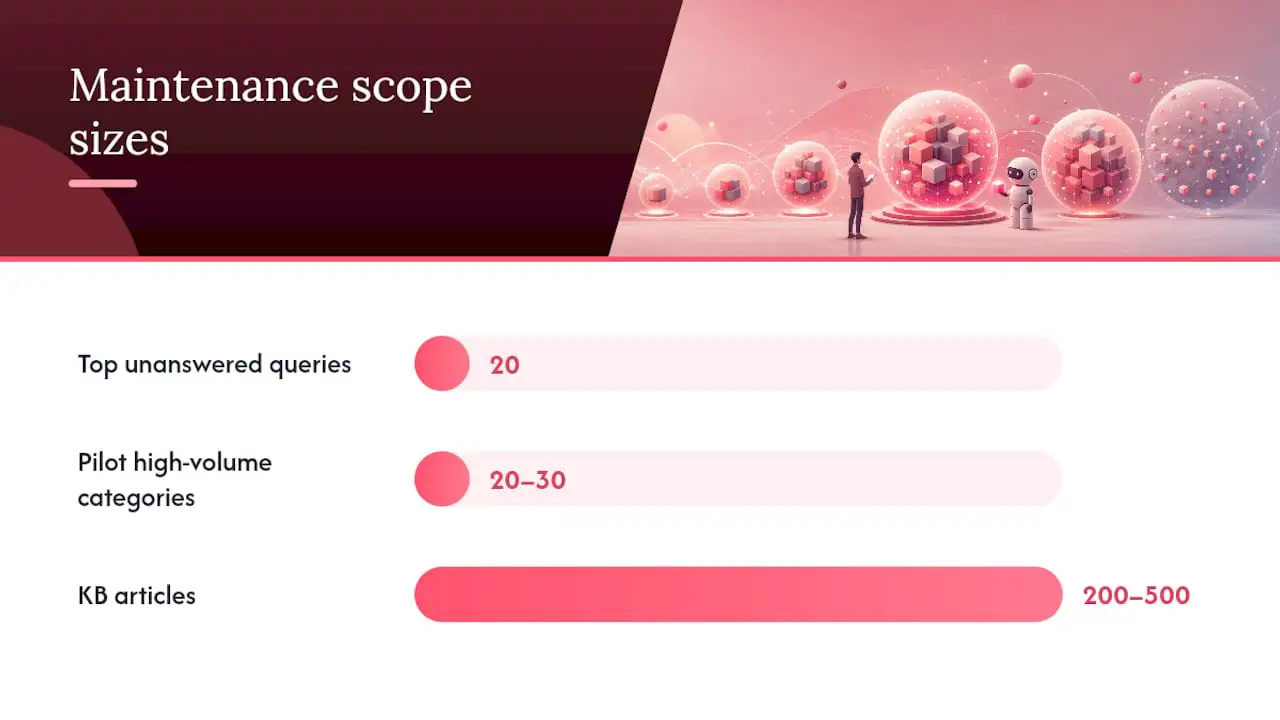
The most practical use of logs is generating a top-20 unanswered queries list every week. Sort by volume, assign each to a content owner, and track time-to-close. That list becomes your maintenance backlog.
Tooling patterns and integration checklist
The right tooling makes the playbook above repeatable without heroic manual effort. When evaluating platforms and integration patterns, prioritize these capabilities:
- Incremental indexing: The system can update individual chunks without re-indexing the entire KB. Critical for large KBs where full re-indexing is slow and expensive.
- Embedding refresh: Ability to regenerate embeddings for updated articles without touching unchanged content.
- Provenance and citation support: Every retrieved chunk carries a source reference that surfaces in the answer.
- Role-based access control: Content owners, approvers, and ML engineers have different permissions. The platform must enforce that.
- Audit logs: Every indexing event, content change, and approval is logged with a timestamp and user.
- Webhooks for ticketing: When a ticket is resolved, a webhook can trigger a KB review or auto-draft a candidate article. This closes the loop between support operations and knowledge maintenance.
- SSO: Google and Microsoft SSO reduce friction for teams already in those ecosystems.
Integration patterns that work in production
Direct KB sync: The KB platform pushes updated articles to the vector DB on a schedule or on publish. Simple, reliable, and the right starting point for most teams.
Staged sandbox indexing: New or updated content is indexed in a staging environment first. The test suite runs against staging before any change reaches production. This is the equivalent of a CI pipeline for knowledge content.
CI-like validation pipelines: Treat KB changes like code changes. A content update triggers an automated test run against your 20 to 30 query test set. Failures block the publish. Passes route to the approver for final sign-off.
Key trade-offs to understand
RAG is the right architecture for most support teams with frequently changing knowledge. You update documents, not model weights, which keeps costs manageable and update cycles short. Fine-tuning makes sense for static, highly specialized domains where the vocabulary and reasoning patterns are stable. The operational cost difference is significant: a RAG update is a document edit and a re-index; a fine-tuning cycle requires labeled data, compute time, and a full model evaluation before deployment.
On latency versus freshness, more frequent embedding refreshes keep answers current but add compute cost. Choose a refresh schedule based on how often source material changes, and run validation after important updates.
How Deskhero maps to this maintenance playbook
Deskhero is built around the principle that a chatbot should answer only from knowledge you have explicitly approved, which maps directly to the governance and validation steps in this playbook.
Here is how specific playbook steps connect to Deskhero features:
- Approved-knowledge-only answers: Deskhero’s AI chatbot answers from approved public FAQ content. Other workspace knowledge is not used for customer-facing chatbot answers. Enabling the chatbot requires at least 100 approved public FAQ items.
- FAQ suggestions from resolved tickets: Resolved tickets and scraped website pages can be distilled into candidate FAQ entries. A User reviews and approves an entry before it can become available to the chatbot.
- Separate knowledge scopes: The internal knowledge base can inform AI reply suggestions for Users. Customer-facing chatbot answers use only the approved public FAQ.
- Two-way email sync: Customer questions arrive by email, form, or chatbot and become tickets in a shared inbox. Replies can go out from the company’s connected address.
- Labeled automatic actions: Automatic actions are labeled and logged, and fully automatic sending is opt-in.
- REST API: Deskhero provides a REST API for ticket and workspace operations. It does not provide outbound webhooks.
- Multilingual interface: Deskhero’s interface is available in 14 supported languages, and chatbot retrieval can match public FAQ content across languages.
Deskhero connects Gmail, Google Workspace, or Microsoft 365 mailboxes to a shared helpdesk while letting the team keep its existing email addresses. Its customer-facing AI answers from approved public FAQ content and hands unresolved questions to a human. FAQ suggestions can be drafted from resolved tickets and scraped website pages, but a User must review them before approval. Automatic actions are labeled and logged. The platform also includes an internal knowledge base, ticket insights, 14 interface languages, Shopify integration, Google and Microsoft SSO, and a REST API. It starts with a 30-day free trial, with no credit card needed.
Because Deskhero’s chatbot is limited to the approved public FAQ, the maintenance task is concrete: review unresolved questions, improve or add FAQ entries, approve them, and check whether the updated knowledge answers the intended questions.
For a deeper look at how AI chatbots handle escalation and human handoff within this kind of workflow, the chatbot human handoff guide covers the operational patterns in detail.
Maintenance cadence, staffing, and cost considerations
Planning the people and time behind chatbot knowledge management is where most teams underestimate the work. The good news: a small team with a clear cadence can maintain a production KB without dedicated headcount.
Recommended cadences:
- Weekly: Review conversation logs, pull the top-20 unanswered queries list, flag urgent content gaps, push high-priority fixes through the approval gate.
- Monthly: Run a full content update cycle. Author new articles, update changed policies or products, retire stale content, and run the full test suite.
- Quarterly: Policy and product change review, retriever tuning, embedding model evaluation, and a governance audit (are all articles properly approved and versioned?).
Minimal staffing model for small teams:
- Knowledge steward: Owns the editorial calendar, runs audits, enforces standards, and manages the approval queue. The time required depends on content volume and change frequency.
- Technical support: Handles chunking parameters, embedding refreshes, retrieval configuration, and test-suite maintenance when the team manages its own retrieval stack.
- Rotating subject-matter experts: Each product or policy domain has a designated content owner who reviews and approves articles in their area. This is typically a part-time responsibility added to an existing role.
Cost drivers to estimate:
- Vector database storage and query costs scale with KB size and query volume.
- Embedding refresh frequency affects compute cost, so refresh changed content when the platform supports incremental updates.
- Human review time can be a substantial cost, especially when products or policies change frequently.
- Tooling subscription costs vary by platform. Platforms that bundle KB management, ticketing, and chatbot into a single subscription (rather than requiring separate vector DB, LLM API, and helpdesk tools) reduce both cost and integration complexity.
Research on generative AI in customer support has found productivity gains in a real support setting. Treat those findings as context rather than a staffing formula, because the cost and benefit of knowledge maintenance depend on the team, content, and tools.
Piloting on a low-cost scope: Start with 20 to 30 high-volume question categories. Build and maintain those articles first. Verify that answer quality improves before expanding the KB. This keeps the initial maintenance burden small and builds internal confidence in the process.
How to validate new knowledge sources before integration
Not every document that looks useful belongs in the chatbot’s index. Integrating a low-quality or inaccurate source degrades the entire KB because the retriever has no way to distinguish a well-sourced article from a poorly written one.
Run every candidate source through these checks before indexing:
Accuracy check: Does the content reflect current product behavior, policy, or pricing? Cross-reference against the system of record (your CRM, product documentation, or legal team’s approved policy docs). If you cannot verify a claim against a primary source, do not index it.
Scope check: Is the content relevant to the questions your chatbot is expected to answer? A broad industry whitepaper may contain accurate information but introduce off-topic retrieval noise. Scope documents tightly to your use case.
Duplication check: Does this content overlap significantly with an existing KB article? Duplicate content creates retrieval ambiguity. Merge or consolidate before indexing.
Format and structure check: Is the document structured so chunking will produce coherent, self-contained passages? A document with heavy cross-references (“see section 4.2 for details”) chunks poorly because individual chunks lose context. Rewrite or restructure before indexing.
Provenance check: Can you trace the content to an authoritative internal or external source? For regulated topics, document the source explicitly in the article metadata.
Staging test: Index the new source in a staging environment and run your standard 20 to 30 query test set. Check whether the new content improves, degrades, or has no effect on retrieval accuracy. Only promote sources that improve or maintain accuracy.
How to use user feedback to refine chatbot knowledge
User feedback is the most direct signal you have about where the KB is failing. The challenge is capturing it systematically rather than reacting to the loudest complaints.
Thumbs up/down on chatbot responses is the simplest feedback mechanism. Every chatbot response should carry a binary rating option. Aggregate these weekly. A response with a high thumbs-down rate is a direct flag for KB review, regardless of whether the answer looked correct to the authoring team.

Post-conversation CSAT surveys give a broader signal. Low scores on bot-handled conversations, filtered by topic category, tell you which content areas need the most attention. Pair CSAT data with escalation logs to confirm whether the issue is a KB gap or a retriever configuration problem.
Support-team feedback loops are valuable. Users who handle escalations often know why the bot failed. A simple tagging system in your ticketing tool, such as “wrong answer,” “missing answer,” or “outdated policy,” can turn that experience into a structured maintenance signal.
Explicit “I don’t know” logs are a goldmine. Every time the chatbot escalates because it found no relevant content, log the query. Sort by volume weekly. The top queries on that list are your highest-priority authoring tasks.
Periodic user surveys on KB quality (sent to customers who interacted with the chatbot in the past 30 days) surface systemic issues that individual conversation ratings miss. Keep the survey to two or three questions and tie responses to conversation IDs so you can trace feedback to specific articles.
The feedback loop closes when a flagged query becomes a KB article, the article goes through the approval workflow, and the chatbot’s response to that query improves. Tracking that cycle time (from flag to fix) is one of the most useful operational metrics a knowledge steward can own.
What support teams actually learn running this in production
The playbook above is correct in theory. Here is what breaks in practice and how to fix it fast.
Start small and prove value before scaling. Indexing every available document at once can create a bloated KB and make it hard to establish a useful quality baseline. Pick 20 to 30 high-volume question categories, build clean articles for those, and run the chatbot on that narrow scope. Expand after tests show that the answers are accurate and useful.
Handle time-bound content explicitly. Promotions, seasonal policies, and limited-time offers can easily become stale. Create a separate metadata tag for time-bound content and set a mandatory expiration review date at authoring time.
Log and track unknown answers regularly. Reviewing the “I don’t know” log frequently helps teams catch repeated gaps before they accumulate. Use query volume and customer impact to prioritize fixes.
Pro Tip: Resolved tickets are useful source material for canonical answers because they show how the team handled real questions. Deskhero periodically uses resolved tickets as source material for FAQ suggestions. A User can review, edit, approve, or decline each suggestion before approved content becomes available to the chatbot.
Quick fixes for teams just getting started:
- Establish a naming convention for articles on day one (Product Area: Topic: Audience). Retroactively renaming 200 articles is painful.
- Create a metadata template with required fields and paste it into every new article before writing.
- Build a test suite of 20 to 30 real queries from early conversation logs and run it before each production push.
Deskhero makes the maintenance playbook operational from day one
Running this playbook across disconnected tools can create extra coordination work. Deskhero brings the public FAQ review workflow, FAQ suggestions, and customer conversations into the same helpdesk.
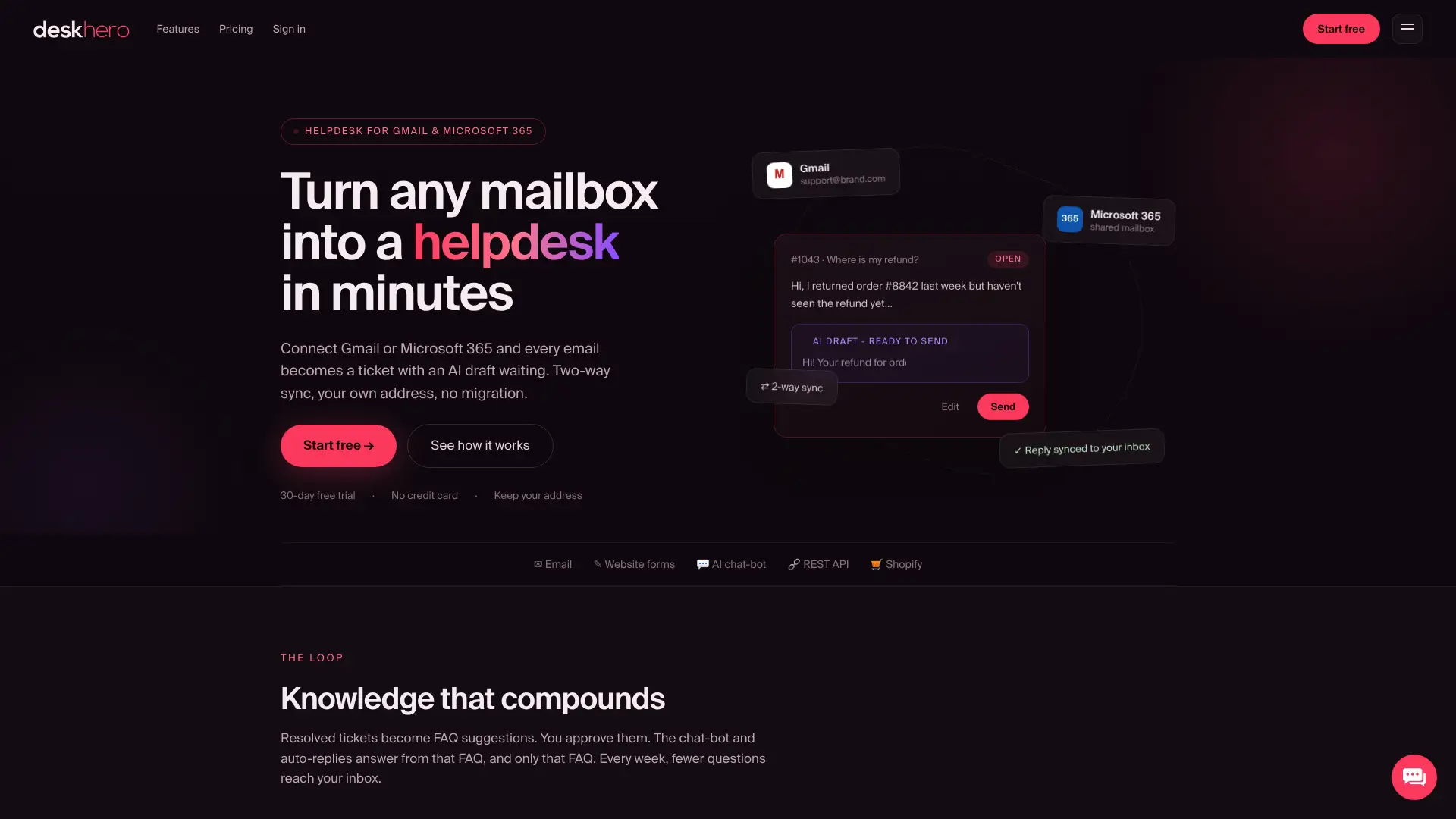
The chatbot answers only from approved public FAQ content, while AI reply suggestions for Users can draw on broader workspace knowledge. FAQ suggestions from resolved tickets and scraped website pages reduce the work of drafting from scratch, but they still require human review. Two-way mailbox integration keeps tickets and replies connected to the team’s existing address.
For teams that want this workflow without assembling a custom retrieval stack, Deskhero combines the shared inbox, public FAQ, chatbot, and human handoff. Start a 30-day free trial at Deskhero, no credit card required.
Sources
Use these as implementation references when making technical choices on chunking strategy, training approach, governance policy, and measurement setup.
FAQ
What is a chatbot knowledge base?
A chatbot knowledge base is a curated set of source documents, chunked into passages, converted into vector embeddings, and stored in a vector database so a retriever can pull the most relevant content at query time and ground the chatbot’s answers in your actual content.
How do you maintain a chatbot over time?
Run a repeatable cycle: audit conversation logs to find gaps, update or author canonical articles, chunk and embed in a staging environment, validate against a 20 to 30 query test set, get approver sign-off, publish to production, and monitor answer quality and handoffs for regressions.
What should you never tell a chatbot?
Avoid entering sensitive personal data (Social Security numbers, passwords, financial account details) into any chatbot interface, as inputs may be logged or used in model training depending on the platform’s data handling policy. For internal KB authoring, never hardcode live data (pricing, inventory) that an ingest pipeline can fetch directly from the system of record.
How much does it cost to maintain a chatbot?
The main costs are review time, retrieval and embedding compute when those components are managed directly, and any helpdesk or knowledge-platform subscription. Estimate them from content volume, query volume, update frequency, and the amount of human review required.