Best Zendesk Alternatives for SMB Support Teams in 2026

Zendesk is not the only option for a small or mid-sized support team. The right alternative depends on the channels you serve, the systems you already use, the amount of administration you can support, and how each vendor charges for AI.
Deskhero is a strong option for teams that want to turn an existing Gmail or Microsoft 365 mailbox into a shared helpdesk without changing their customer-facing address. It combines email ticketing, forms, an AI chat-bot, Shopify context, and AI-drafted replies. Its customer-facing AI answers only from an approved public FAQ.
Here is the short version of what else is worth evaluating:
- Email-first shared inbox (for example, Help Scout): A practical choice when email and a straightforward interface are the priorities.
- Omnichannel helpdesk (for example, Freshdesk): Worth considering when email, chat, voice, and other channels need to share one service platform.
- AI-first customer service (for example, Intercom): A fit for teams that want an AI assistant across chat and email and are comfortable with outcome-based AI charges.
- CRM-embedded service (for example, Salesforce Service Cloud or HubSpot Service Hub): A natural shortlist choice when the company already depends on the matching CRM.
- IT service management (for example, Jira Service Management): Designed around requests, incidents, problems, changes, knowledge, and assets.
- Commerce-focused helpdesk (for example, Gorgias): Built around ecommerce support and usage-based ticket billing.
- Collaborative omnichannel inbox (for example, Front): Combines shared inboxes, ticketing, workflows, and multiple communication channels.
The bottom line: Start with your required channels and integrations, then compare the full billing model. Include Users, AI usage or outcomes, ticket allowances, add-ons, and the time needed to configure and maintain the system.
Table of Contents
- What are the best Zendesk alternatives in 2026?
- How does each alternative actually perform?
- How do you pick the right Zendesk alternative?
- How do you switch from Zendesk without losing context?
- Why Deskhero stands out from the field
- Which alternative should you choose for your use case?
- Key takeaways
- What most teams get wrong when evaluating helpdesks
- Deskhero: a mailbox-first Zendesk alternative
- Sources and further reading
- FAQ
What are the best Zendesk alternatives in 2026?
The table below compares broad product categories. Prices and packaging change, so confirm the current plan details with each vendor before buying.

| Category | Billing shape | Channels | AI approach | Good fit when |
|---|---|---|---|---|
| Deskhero | Monthly per User, with a three-User minimum and plan quotas | Email, web form, AI chat-bot | Drafts use workspace knowledge. Chat-bot and AI auto-replies use only approved public FAQ items | You want to connect Gmail or Microsoft 365 and keep the same address |
| Email-first shared inbox | Often User-based, with separate AI usage charges on some plans | Email, help center, chat or website widget depending on product and plan | Drafting and customer-facing answers vary by vendor | Email simplicity matters more than a broad channel set |
| Omnichannel helpdesk | User plans plus possible AI session, Copilot, or connector charges | Email, chat, voice, and other channels depending on plan | AI assistance and automated service | You need several service channels in one system |
| AI-first customer service | Platform plan plus outcome-based AI charges | Chat, email, and other supported channels | Customer-facing AI resolution with human handoff | Automated resolution is central to the buying decision |
| CRM-embedded service | User plans, editions, and optional products | Varies by suite and edition | AI assistance tied to CRM and service data | Your customer data and workflows already live in the same CRM |
| IT service management | Free and paid service-management plans, often by User | Portal, email, chat, and integrations depending on plan | AI for service management and incident workflows | You manage internal services, incidents, changes, or assets |
| Commerce-focused helpdesk | Ticket allowance plus overages, with separate AI outcome charges | Email, chat, forms, social integrations, and paid voice or SMS add-ons | AI designed for ecommerce conversations and actions | Shopper and order context drive most support work |
| Collaborative omnichannel inbox | Per-seat plans with optional AI add-ons on some tiers | Email, SMS, social, WhatsApp, chat, and voice integrations depending on plan | AI assistance, automation, quality, and customer-satisfaction tools | Several teams collaborate on customer conversations |
Three cost questions to settle before signing:
- How is AI billed? Look for per-resolution, per-outcome, per-session, per-conversation, or per-seat charges. Ask what counts as billable and whether limits or overages apply.
- Which features are add-ons? Voice, SMS, AI assistance, analytics, quality tools, connectors, and onboarding can sit outside the base plan.
- How much administration is required? Configuration, workflow rebuilding, training, and ongoing maintenance are real costs even when they do not appear on the invoice.
How does each alternative actually perform?
Deskhero: mailbox-sync helpdesk with controlled AI
Deskhero connects to Gmail, Google Workspace, Microsoft 365, and Outlook through two-way mailbox sync. It can also work with an owned domain through DNS and forwarding. Replies go from the company address, and incoming conversations become tickets in a shared inbox.
The distinction between Deskhero's AI features matters. AI reply suggestions can use the workspace knowledge pool, including answered tickets, approved FAQs, internal knowledge, imported material, scraped website pages, and Shopify products. Customer-facing AI auto-replies and the AI chat-bot use only approved public FAQ items. Both customer-facing features are opt-in.
Standout features:
- Two-way Gmail and Microsoft 365 mailbox sync
- AI-drafted replies informed by workspace knowledge
- AI chat-bot and AI auto-replies grounded only in the approved public FAQ
- FAQ suggestions created from resolved tickets and scraped website pages, with human review before approval
- Website forms that create tickets
- 14 interface languages and ticket translation
- Read-only Shopify customer and order context in the ticket view
- Google and Microsoft sign-in, a REST API, and a .NET SDK
- Automation rules for new tickets, statistics, SLA policies, and a topics cluster
- A 30-day free trial
Important limits: The AI chat-bot requires at least 100 approved public FAQ items before it can be enabled. Deskhero does not provide a native voice channel, a native mobile app, ongoing IMAP sync, outbound webhooks, or live chat with a human User. Its automations run when a new ticket is created, not on later ticket updates or a schedule.
Ideal for: Small and mid-sized teams that rely on Gmail or Microsoft 365, want their existing address to remain customer-facing, and prefer customer-facing AI that is constrained to approved FAQ content.
Email-first shared inbox (for example, Help Scout)
Help Scout combines shared inboxes with a knowledge base, a website widget, and AI features. Its AI Answers feature uses the company's website and Docs knowledge base. Help Scout documents resolution-based charges for AI Answers after the trial period, so include expected AI use in the budget.

Why shortlist it: The product is centered on email support and help content, with customer-facing AI available in its Beacon widget.
Check during the trial: Confirm the inboxes, knowledge features, reporting, integrations, and AI allowance available on the plan you are considering. Do not assume every feature is included in the base price.
Omnichannel helpdesk (for example, Freshdesk)
Freshdesk offers ticketing and a shared inbox, while Freshdesk Omni adds broader omnichannel service. Freshworks describes support across email, chat, and voice, with AI assistance and automated service. Current packaging includes plan-specific features and optional charges for additional AI sessions, AI Copilot, and connector tasks.
Why shortlist it: It covers a wider set of channels and service-management features than an email-only shared inbox.
Check during the trial: Verify which Freshdesk product and plan contains the channels, routing, reporting, security, and AI features you need. Freshdesk and Freshdesk Omni have different packaging.
AI-first customer service (for example, Intercom)
Intercom's Fin works across chat and email. Intercom charges for defined outcomes, including resolutions and certain configured handoffs. It also documents usage reminders and hard limits, which can help a team control consumption.
Why shortlist it: Automated customer service is central to the product, rather than an incidental feature.
Check during the trial: Test the questions Fin can answer from your content, the handoff experience, and the exact outcome definitions that apply to your workflows. Model the bill using both normal and peak conversation volume.
CRM-embedded service cloud (for example, Salesforce Service Cloud, HubSpot Service Hub, or Zoho Desk)
A CRM-embedded service product can reduce system switching when customer records, sales activity, and service workflows already live in the same suite. Salesforce, HubSpot, and Zoho each package service capabilities differently, so this category should be compared at the edition and add-on level rather than by brand name alone.
Why shortlist it: The strongest reason is shared CRM context and governance.
Check during the trial: Build one representative workflow from intake to resolution. Confirm permissions, routing, reporting, customer history, integration behavior, and the administrative work needed to maintain it.
IT service management (for example, Jira Service Management)
Jira Service Management supports request, incident, problem, change, knowledge, asset, and configuration management. It is closely connected to Jira and the Atlassian ecosystem, which can be useful for teams that coordinate service work with development and operations.
Why shortlist it: It is designed for structured service-management practices, not just a customer email queue.
Check during the trial: Confirm the plan required for assets, advanced incident or change management, AI, identity controls, and service commitments. Also test whether the interface and terminology work for the people who will use it every day.
Commerce-focused helpdesk (for example, Gorgias)
Gorgias is positioned for ecommerce support and integrates with Shopify and other commerce tools. Its helpdesk billing is based on billable tickets rather than team size. Its AI assistant is charged separately for qualifying automated outcomes, while voice and SMS are paid add-ons.
Why shortlist it: Ecommerce data and shopper workflows are central to the product.
Check during the trial: Verify the store actions, customer context, channels, ticket allowance, AI outcome allowance, and overage rates required for your expected volume.
Collaborative omnichannel inbox (for example, Front)
Front combines shared inboxes and ticketing with workflows, analytics, and multiple communication channels. Its Professional and Enterprise plans support omnichannel service, while AI products can be included or sold as add-ons depending on the plan.
Why shortlist it: It is designed for teams that collaborate around customer conversations across email and other channels.
Check during the trial: Confirm the channel limits, workspaces, automation rules, analytics, AI add-ons, identity features, and onboarding requirements for the plan you expect to buy.
Pro Tip: Ask every vendor the same question: Which sources can your customer-facing AI use, what happens when it is not confident, and exactly when does an interaction become billable?
How do you pick the right Zendesk alternative?
The must-have vs. nice-to-have framework
Start with the channels customers actually use. Then list the inbox, routing, reporting, security, knowledge, integration, and data-retention requirements that are non-negotiable. Features that do not serve a documented workflow belong in the nice-to-have column.
Write down billing deal-breakers too. Examples include an AI charging unit you cannot forecast, a plan that omits required identity controls, or a ticket allowance that makes seasonal peaks expensive.
Questions to ask during vendor trials
These questions are worth copying into a trial checklist:
- Which sources can the AI use for draft replies and customer-facing answers?
- What happens when the AI cannot answer confidently?
- Which AI events are billable, and can we set a hard usage limit?
- Which channels and integrations are native, and which require an add-on or third-party service?
- What is included in the audit trail for automated activity?
- Which SSO, provisioning, and security controls are included in this plan?
- What support commitment applies to this plan?
- How can we export tickets, messages, attachments, users, and configuration data?
Red flags to watch for
- Unclear AI billing: If the vendor cannot define the charging unit and show a peak-volume scenario, the budget is not ready.
- Plan ambiguity: A feature on a product page might require a higher tier, a separate product, or an add-on.
- Weak handoff: Customer-facing AI should preserve the question and relevant context when a person needs to take over.
- Shallow integration: Confirm the data and actions available inside the support interface, not just whether an integration logo is present.
- Limited portability: Test a small export before committing to a long contract.
Estimating total cost of ownership
Model five buckets: recurring licenses, AI usage, ticket or conversation overages, add-ons and third-party services, and internal administration. Include onboarding and migration work in the first year. Use at least three volume scenarios: normal, peak, and growth.
Pro Tip: Keep a configuration log during the trial. Record each task, who performed it, and how long it took. That turns administrative effort into a number you can include in the comparison.
How do you switch from Zendesk without losing context?
Migration phases for small and mid-sized teams
| Phase | Tasks | Exit condition |
|---|---|---|
| Discovery | Inventory ticket data, fields, statuses, tags, macros, triggers, knowledge, reports, integrations, and retention requirements | Every required object has an owner and a keep, transform, archive, or retire decision |
| Trial setup | Connect a test channel, configure access, and recreate a small set of representative workflows | The team can process test tickets end to end |
| Pilot | Use a controlled queue or mailbox, test integrations and escalations, and collect User feedback | Critical workflows, exports, and rollback steps have passed |
| Migration and cutover | Move the agreed data, connect production channels, switch integrations, and monitor routing | New conversations arrive in the correct system and historical context is available as designed |
| Wrap-up | Resolve exceptions, document ownership, train Users, and keep the old system available according to the retention plan | Operational owners accept the new process |
Step-by-step migration checklist
- Map the data. List the ticket fields, statuses, priorities, tags, users, organizations, knowledge content, attachments, and audit history you need to retain.
- Separate channel connection from history migration. Deskhero can connect Gmail or Microsoft 365 while keeping the same email address, but that does not automatically move a full Zendesk archive. Decide how old tickets will be retained or imported.
- Rebuild only useful workflows. Document what each macro or trigger accomplishes before recreating it. Retire rules that no longer serve a clear purpose.
- Clean the knowledge base. Remove outdated or contradictory material before it becomes a source for AI or self-service.
- Test integrations one at a time. Verify the specific data fields and actions each integration supports.
- Train Users on real scenarios. Include intake, assignment, internal notes, customer replies, escalation, closure, search, and export.
- Prepare a rollback plan. Define how channels can be switched back, who makes the decision, and how tickets created during the pilot will be reconciled.
Common pitfalls
- Lost conversation structure: A flat export may preserve message text without preserving threads, recipients, attachments, or events.
- Unmapped identities: Users, requesters, organizations, and shared mailboxes can use different identity models across products.
- Silent routing changes: Test each address, form, group, and after-hours path after cutover.
- Assuming feature names are equivalent: Two products can use the same label for features with different triggers, permissions, and limits.
During the pilot, measure first-response time, resolution time, reassignments, unresolved AI handoffs, configuration hours, and the projected bill at normal and peak volume.
Why Deskhero stands out from the field
Deskhero begins with the mailbox many small teams already use. That can reduce channel cutover work, although teams that need historical Zendesk tickets must still plan how to retain or migrate them.
Core capabilities:
- Mailbox connection: Gmail and Microsoft 365 use two-way sync, and replies continue to use the company's address.
- Controlled customer-facing AI: The chat-bot and AI auto-replies answer only from approved public FAQ items and hand unresolved questions to a person.
- Broader knowledge for drafts: AI reply suggestions can use answered tickets, internal knowledge, approved FAQs, scraped web pages, imported material, and Shopify product information.
- Attachment-aware drafts: Suggested replies can use supported images, PDFs, and Word documents within documented limits.
- FAQ workflow: Deskhero suggests FAQ items from resolved tickets and scraped pages, and a person reviews them before publication.
- Shopify context: The read-only panel can show customer totals, orders, payment and fulfillment status, tracking links, line items, and shipping details.
- Language tools: Deskhero has 14 interface languages and ticket translation.
- Access and integration: Google and Microsoft sign-in, personal API tokens, a REST API, and a .NET SDK are available.
- 30-day free trial: New workspaces can evaluate the service before choosing a paid plan.
What to test in week 1: Connect a mailbox, invite the people who will use the shared inbox, create tickets through email and a form, test assignment and replies, and review AI draft sources. If you want the AI chat-bot, remember that activation requires at least 100 approved public FAQ items.
Which alternative should you choose for your use case?
Use cases narrow the shortlist more effectively than a generic feature count:
-
Small email-first team: Compare Deskhero with an email-first shared inbox. Deskhero is especially relevant when Gmail or Microsoft 365 connection, approved-FAQ customer answers, and a Shopify panel matter.
- Trial check: Connect the mailbox, process representative tickets, and verify assignment, private notes, search, and reply behavior.
-
Product-led company with high chat volume: Evaluate AI-first customer-service platforms and compare their answer sources, human handoff, controls, and outcome pricing.
- Trial check: Test common questions, ambiguous questions, account-specific requests, and explicit requests for a person.
-
Ecommerce brand: Compare Deskhero and commerce-focused platforms using real shopper scenarios. Deskhero provides read-only Shopify context, while other products may support a different set of commerce actions and channels.
- Trial check: Open tickets for customers with multiple orders and verify exactly which customer, order, fulfillment, return, and product data is available.
-
Team already committed to a CRM: Include the CRM vendor's service product. Shared identity, customer data, permissions, and reporting may outweigh a lower standalone helpdesk price.
- Trial check: Follow one customer from CRM record to service request and back, checking data ownership and update behavior.
-
IT service desk: Start with IT service-management products. Request, incident, problem, change, asset, and configuration workflows require a different evaluation from customer email support.
- Trial check: Run a request, an incident, and a change through their full workflows and verify approvals, service targets, and reporting.
Deskhero is a practical starting point when the team prioritizes mailbox connection, human-reviewed knowledge, and constrained customer-facing AI. It is not the right fit when native voice, live human chat, mobile-first work, outbound webhooks, or complex IT service management are mandatory.
Key takeaways
The best Zendesk alternative is the one that fits the team's channels, data, controls, and billing model without creating more operational work than it removes.
| Point | Details |
|---|---|
| Model total cost | Include Users, AI units, ticket or conversation overages, channels, add-ons, onboarding, migration, and administration. |
| Test AI boundaries | Verify sources, confidence behavior, handoff, auditability, usage controls, and the billing definition. |
| Separate connection from migration | Keeping an existing email address can simplify cutover, but historical tickets still need a retention or migration plan. |
| Match the product category to the work | Email support, omnichannel customer service, ecommerce support, CRM service, and IT service management have different requirements. |
| Know Deskhero's boundaries | Deskhero offers mailbox sync, forms, controlled AI, Shopify context, and a 30-day trial, but it does not provide native voice or live human chat. |
What most teams get wrong when evaluating helpdesks
The most common mistake is comparing feature labels instead of complete workflows. A shared inbox, AI answer, automation rule, audit trail, or Shopify integration can behave very differently across products.
Trials should include ordinary tickets and awkward edge cases. Test unclear requests, attachments, duplicate messages, reassignment, unavailable Users, integration errors, AI uncertainty, exports, and a sudden increase in volume. The goal is to find operational limits while the team can still walk away.
AI billing deserves its own model. Vendors use several charging units, including outcomes, resolutions, sessions, conversations, and seat add-ons. Those units are not interchangeable. Read the vendor's definition and estimate usage from actual conversations where possible.
Finally, confirm what the named plan includes. Product pages often describe the whole platform, while pricing pages divide channels, security, analytics, AI, and support across editions and add-ons.
Deskhero: a mailbox-first Zendesk alternative
Deskhero can connect Gmail or Microsoft 365 and turn incoming conversations into shared tickets while retaining the company's email address. That provides a direct path to testing the inbox, assignment, forms, replies, knowledge, and AI draft workflow.
Customer-facing AI remains under explicit control. The AI chat-bot and AI auto-replies are opt-in and use only approved public FAQ items. Suggested replies for Users can draw on the wider workspace knowledge pool. Enabling the chat-bot requires at least 100 approved FAQ items.
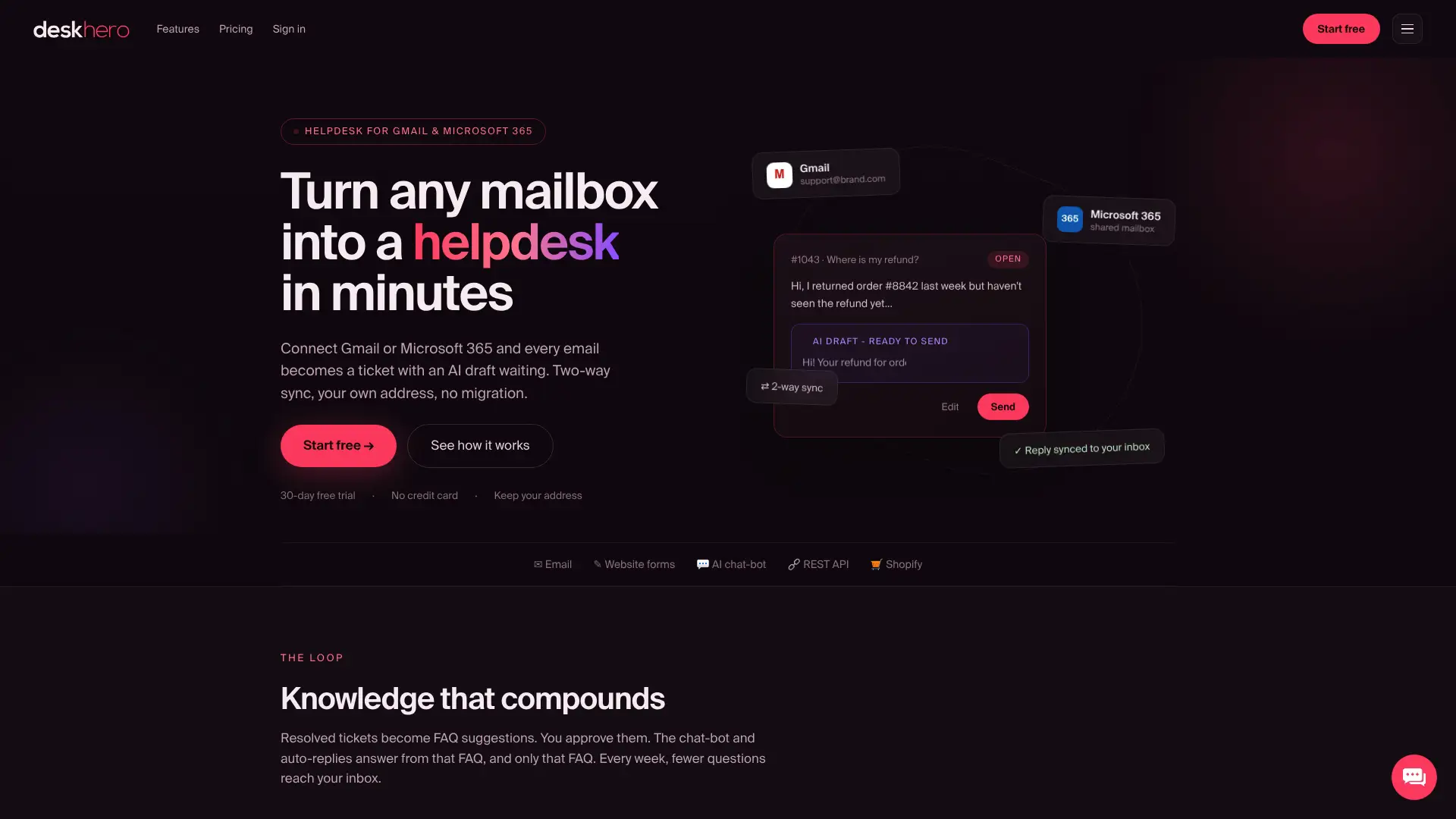
The 30-day free trial gives a team time to connect a mailbox and test representative tickets. Before committing, also test data export and review the current plan quotas for tickets, mailboxes, forms, web-scraped pages, Shopify products, lists, and chat-bot sessions. Visit Deskhero for current product and pricing information.
Sources and further reading
Use current vendor documentation for the shortlist. Packaging and prices can change.
- Help Scout billing and plans guide: plan structure and AI Answers billing references.
- Freshdesk pricing: current plans, included features, and available add-ons.
- Intercom pricing: current plans and Fin outcome pricing.
- Salesforce Service Cloud: product editions and service capabilities.
- Jira Service Management features: request, incident, problem, change, knowledge, asset, and configuration management.
- Gorgias billing documentation: ticket fees, AI outcome fees, add-ons, and overages.
- Front pricing: plan features, channels, and AI add-ons.
- Deskhero Shopify support: Deskhero's Shopify-focused product overview.
FAQ
What is the best Zendesk alternative for small teams?
There is no single best choice for every small team. Email-first teams should compare Deskhero with shared-inbox products. Teams with several channels, an established CRM, ecommerce workflows, or IT service-management requirements should start with the matching category.
How long does it take to migrate from Zendesk?
The timeline depends on ticket volume, attachments, custom fields, workflows, knowledge content, integrations, retention rules, and the destination product's import tools. Run a representative pilot before setting a cutover date.
Which Zendesk alternatives have the most predictable pricing?
Pricing is most predictable when the charging units match quantities the team can forecast. Compare User fees, AI outcomes or sessions, ticket allowances, channel add-ons, overages, and required onboarding under normal and peak volume.
Is Freshdesk a good Zendesk replacement?
Freshdesk belongs on the shortlist when a team wants ticketing and a shared inbox, while Freshdesk Omni is relevant for broader channel coverage. Verify the exact product, plan, AI charges, and add-ons against your requirements.
Does Deskhero work with Shopify?
Yes. Deskhero provides a read-only Shopify panel in the ticket view with customer, order, payment, fulfillment, shipping, tracking, and line-item context. Shopify product data can also contribute to AI reply suggestions.