12 Freshdesk Alternatives for Support Teams in 2026

Freshdesk alternatives serve different kinds of support teams. Email-first teams may prefer a shared inbox that works with their existing mailbox. Larger organizations may need workforce management, complex service-level workflows, or broad channel coverage. Product-led companies may prioritize messaging and in-app support. The best choice depends on the channels you use, the workflows you need, and the effort required to switch.
Here is a practical way to narrow the field:
- Email-first teams: Consider Deskhero, Help Scout, Groove, or another shared-inbox product that can preserve your existing support address.
- Teams with broad channel requirements: Look closely at Zendesk, Zoho Desk, LiveAgent, HappyFox, and other products that combine several support channels.
- Product-led SaaS teams: Intercom combines an inbox, messaging, ticketing, workflows, and an AI support product.
- CRM-centered teams: HubSpot Service Hub is most relevant when customer service needs to sit alongside HubSpot's CRM, sales, and marketing tools.
- IT help desks with a limited budget: Spiceworks Cloud Help Desk is a simple option worth evaluating.
Practical tip: Evaluate switching effort alongside subscription cost. Data import, workflow rebuilding, integrations, and user training can all affect the total cost of a change.
AI grounding is another useful buying criterion. Ask which sources an AI feature can use, whether administrators can control those sources, how answers are reviewed, and what happens when the system cannot answer confidently. A vendor's knowledge controls matter more than broad claims about AI accuracy.
Table of Contents
- How do the best Freshdesk alternatives compare at a glance?
- What does each Freshdesk alternative actually offer?
- How do you choose the right Freshdesk alternative?
- Key Takeaways
- The case for specialized tools over all-in-one suites
- Deskhero is worth a serious look for email-first teams
- Useful sources for further research
- FAQ
How do the best Freshdesk alternatives compare at a glance?
| Tool | Good fit for | Core approach | Channels to verify | AI to evaluate | Switching consideration |
|---|---|---|---|---|---|
| Deskhero | Email-first small and midsize teams | Shared inbox connected to an existing mailbox | Email, embedded form, AI chat-bot | Reply drafts, FAQ suggestions, chat-bot, and optional auto-replies | Can start from a connected Gmail, Google Workspace, or Microsoft 365 mailbox |
| Zendesk | Organizations with broad support operations | Customer service suite | Confirm the required email, messaging, voice, and social channels by plan | AI for customers and support teams | Plan for configuration, integrations, and data import |
| Zoho Desk | Teams using the Zoho ecosystem | Omnichannel help desk | Confirm channel availability by edition | Zia features for service workflows | Review CRM integration and migration tools |
| Intercom | Product-led and digital support teams | Omnichannel inbox, messaging, and AI support | Chat, email, voice, and other supported deployments | Fin AI Agent and Copilot | Model projected usage and AI costs |
| Help Scout | Teams that want an email-centered shared inbox | Shared inbox with knowledge and customer-contact tools | Email and web contact experiences | Review current AI features and plan limits | Map mailboxes, workflows, and knowledge content |
| HubSpot Service Hub | Organizations already using HubSpot CRM | Service tools connected to the HubSpot customer platform | Confirm channels and calling availability by plan | Review current service AI and automation features | Best evaluated in the context of the wider HubSpot stack |
| LiveAgent | Teams that need several real-time channels | Ticketing, live chat, call center, social, and knowledge tools | Email, live chat, phone, and supported social channels | AI chatbot and answer tools | Check which channels and features each plan includes |
| HappyFox | Teams that want structured ticketing and automation | Help desk with knowledge, reporting, and workflow tools | Verify each required channel and integration | Review HappyFox AI products against your use case | Test administration and workflow setup |
| ProProfs Help Desk | Small teams seeking straightforward ticket management | Shared inbox and help desk | Confirm the current email and chat offering | Review current AI assistance by plan | Check import, export, and reporting requirements |
| Kayako | Teams focused on a unified customer conversation history | Customer service platform | Confirm current channel support | Review current automation and AI capabilities | Validate product fit and migration support directly |
| Groove | Small, email-first support teams | Shared inbox, knowledge base, and reporting | Email and web support tools | Review current AI assistance | Map existing mailboxes and workflows |
| Spiceworks | Internal IT help desks | Cloud help desk and IT community | Email and web ticket intake | Not the primary reason to shortlist it | Confirm that its scope fits internal IT rather than customer service |
Features, packaging, and prices change. Confirm the required channels, limits, and AI charges on each vendor's current plan page before buying.
What does each Freshdesk alternative actually offer?
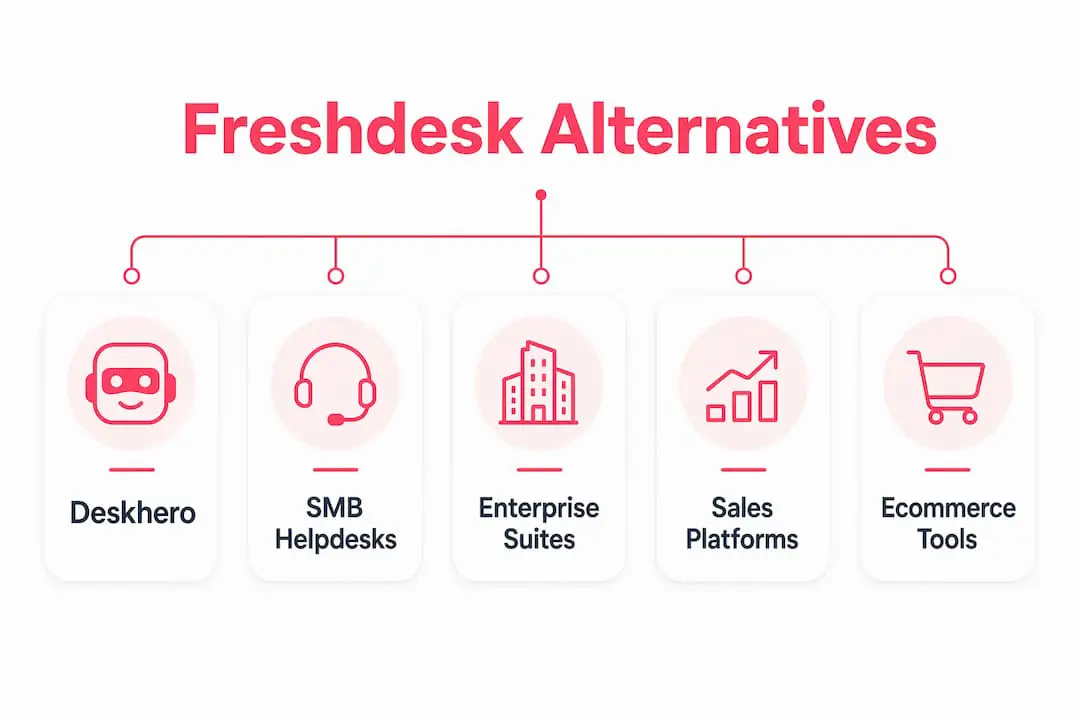
These products do not all compete with Freshdesk in the same way. Some are broad customer service suites, some center on a shared email inbox, and others are designed around live messaging, CRM, or internal IT. Comparing them by category makes the shortlist more useful.
Deskhero: the email-first option
Deskhero connects to Gmail, Google Workspace, and Microsoft 365 mailboxes. Incoming messages become tickets in a shared inbox, and replies can continue to use the company's existing address. Microsoft shared mailboxes are supported. Deskhero also supports forwarding-based mailboxes for other owned domains.
Its AI reply suggestions can use workspace knowledge, including answered tickets, imported sent mail, internal knowledge articles, approved public FAQ items, scraped website pages, and Shopify product data. Customer-facing AI works differently: the chat-bot and AI auto-replies answer only from the approved public FAQ. The chat-bot requires at least 100 approved FAQ items before it can be enabled. If it cannot answer confidently, it falls back to a form for human follow-up.
Key features:
- Two-way email sync with Google and Microsoft mailboxes
- Shared ticket inbox with statuses, priorities, groups, assignments, tags, and custom fields
- AI reply suggestions that can use the workspace knowledge pool
- FAQ suggestions drafted from resolved tickets and scraped pages, subject to human review
- AI chat-bot and optional AI auto-replies grounded only in approved public FAQ items
- Embedded support forms and chat widgets
- Internal knowledge base and fixed Statistics views
- Support for 14 interface languages
- Read-only Shopify integration with customer and order context on tickets
- Google and Microsoft sign-in, REST API, and automation rules for new tickets
Strengths:
- Teams can begin with an existing support mailbox instead of changing their public address.
- Customer-facing AI is restricted to FAQ content that the team has approved.
- Automatic actions are opt-in, labeled, and logged.
Limitations:
- No native voice channel or human live-chat channel
- No native mobile app
- Automation rules run on new tickets, not on later ticket updates or schedules
- Shopify is currently the only packaged third-party integration
Pricing and trial: Deskhero offers a 30-day free trial without a credit card. Paid plans use monthly per-user pricing with a three-user minimum. Confirm current prices and quotas on the vendor's pricing page.
Best for: Small and midsize teams whose main support channel is email and that want a shared inbox, controlled AI assistance, forms, and a clear path to FAQ-based self-service.

SMB and mid-market help desks
This group includes Zoho Desk, Help Scout, LiveAgent, HappyFox, ProProfs Help Desk, Kayako, and Groove. Their scope varies, so compare the exact channels and workflow features you need.
Zoho Desk is especially relevant to organizations already using Zoho products. Its help desk includes multichannel ticket management, automation, knowledge tools, reporting, and Zia AI features. Check the plan matrix carefully because channel and AI availability can differ by edition.
- Strongest fit when Zoho CRM or other Zoho applications are already part of the stack
- Broad help desk and workflow feature set
- Requires a plan-level check for the channels and Zia capabilities you need
Help Scout centers on a shared inbox and a straightforward support experience. It also offers knowledge and customer-contact tools. It is a natural comparison for teams that value email workflows and do not need a large service-management suite.
- Email-centered shared inbox
- Knowledge and website contact experiences
- Review current AI allowances, reporting, and channel coverage by plan
LiveAgent combines ticketing with live chat, a built-in call center, supported social channels, and knowledge tools. It deserves attention when real-time chat or phone support is central to the buying decision. Its plan comparison should determine which channels are available at the level you are considering.
HappyFox provides ticketing, knowledge, automation, and reporting for customer service and service-management use cases. It is worth testing when structured workflows and administration matter more than an email-only experience.

ProProfs Help Desk is aimed at teams seeking shared-inbox ticket handling without the breadth of a large enterprise suite. Confirm its current channel, automation, AI, and reporting options against your checklist.
Kayako emphasizes customer conversations and context across interactions. Because products and packaging change, validate its current channels, integrations, and migration options directly before shortlisting it.
Groove is another shared-inbox choice for small support teams. Its combination of email workflows, knowledge, reporting, and integrations makes it most comparable to other email-first tools.
Common strengths:
- Several choices for teams that do not need an enterprise service suite
- Shared-inbox and knowledge features are widely available
- Some products also cover live chat, voice, or social channels
Common cautions:
- Channel access can depend on the selected plan
- AI products differ in their knowledge sources, controls, and billing
- Import, export, reporting, and automation depth vary substantially
Enterprise and ITSM suites
Zendesk is a broad customer service suite with ticketing, messaging, voice options, AI, knowledge, analytics, integrations, and workforce-related products. That breadth can suit organizations with several support channels and specialized operational requirements.
The trade-off is configuration. A larger suite can require more planning for roles, routing, service levels, integrations, reporting, and data migration. That work may be justified for a complex organization, but smaller teams should test whether they will use enough of the suite to warrant the overhead.
- Broad customer service platform with multiple channel options
- AI products for customer-facing service and support teams
- Large integration marketplace
- Best evaluated with a documented requirements list and implementation owner
Spiceworks Cloud Help Desk is a narrower alternative for internal IT ticketing. Its appeal is simplicity and a free cloud help desk, not broad customer-experience automation. Confirm that its advertising-supported model and IT-focused scope suit your organization.
Sales-driven and SaaS-focused platforms
Intercom combines an omnichannel inbox, ticketing, workflows, messaging, help-center tools, reporting, and Fin AI Agent. Fin can answer across supported channels from configured support content and data, while Copilot assists the human support team. This makes Intercom particularly relevant to digital products that want messaging and AI in the same platform.
HubSpot Service Hub connects service tools with HubSpot's CRM and wider customer platform. It is most compelling when sales, marketing, and service teams already share HubSpot data. Teams outside that ecosystem should compare the value of the complete platform with a more focused help desk.
- Service workspace connected to CRM records
- Ticketing, knowledge, customer feedback, automation, and channel tools
- Packaging varies, so verify required service features by plan
- Best for teams that benefit from shared CRM and service data
Practical tip: For any usage-based AI product, estimate monthly conversations and likely resolutions. Compare that estimate with per-user and platform charges before committing.
Ecommerce-focused platforms
Ecommerce support often requires order context, product information, shipping status, and links back to the commerce platform. A general help desk may provide these through an integration, while a commerce-focused product may offer more specialized workflows.
Deskhero's Shopify integration is read-only. It can show customer, order, fulfillment, tracking, and line-item information in the ticket sidebar. It can also synchronize a plan-limited product catalog for AI reply suggestions. It does not provide order-editing actions from Deskhero.
Key ecommerce evaluation criteria:
- Which customer, order, fulfillment, return, and product details appear in the ticket
- Whether the integration is read-only or can perform commerce actions
- Which social and messaging channels are supported
- How AI uses product and order data, and what controls apply
For teams evaluating WhatsApp as a support channel, confirm the depth of the channel integration, supported message types, routing, and conversation history.
How do you choose the right Freshdesk alternative?
Use a requirements checklist before requesting demos or starting trials:
- Switching effort: Identify the tickets, attachments, customer records, knowledge content, workflows, and reports that must move. Ask what the vendor imports directly and what must be rebuilt.
- AI knowledge and control: Document the sources each AI feature uses. Test unsupported questions and examine the handoff, review, and audit controls.
- Channel coverage: List the channels customers use now. Confirm each channel is available on the plan you would buy.
- Total cost: Include users, minimum commitments, AI usage, messaging or voice charges, add-ons, implementation work, and ongoing administration.
- Integrations: Test the exact CRM, commerce platform, identity provider, and internal tools needed at launch.
- Reporting: Distinguish between standard dashboards, exportable reports, and a configurable report builder. They are not the same capability.
Questions to ask vendors during your trial
| Question | Why it matters |
|---|---|
| Which sources can each AI feature use? | Customer-facing answers and internal reply suggestions may use different knowledge pools. |
| Can I export tickets, conversations, and attachments? | Data portability reduces the risk of a future switch. |
| Which workflows can be imported, and which must be rebuilt? | Workflow rebuilding can be a major part of implementation. |
| Can changes be tested before they affect live tickets? | A safe test process reduces rollout mistakes. |
| Which support and onboarding services are included? | Implementation help and response commitments vary by plan. |
| How are AI, voice, messaging, storage, and add-ons billed? | Usage charges and add-ons can materially change total cost. |
Migration timeline expectations
There is no reliable timeline based on team size alone. A small team with years of data and complicated workflows may need more effort than a larger team with a simple inbox.
For a light switch: Connecting a mailbox and setting up a few users, groups, and forms may be quick. Even then, test sending, receiving, permissions, signatures, notifications, and routing before launch.
For a data migration: Inventory ticket fields, users, attachments, tags, statuses, knowledge articles, and customer records. Run a sample import and reconcile counts before moving the full dataset.
For a complex rollout: Add workflow mapping, service-level rules, integrations, identity management, reports, user acceptance testing, and a rollback plan. The vendor should help produce a schedule based on those requirements.
Red flags to watch for during trials:
- The vendor cannot explain export formats or data ownership clearly.
- Required channels or controls are available only in a different plan than expected.
- AI answers cannot be traced to source material or handed to a person safely.
- Core workflows cannot be tested with realistic sample tickets.
- Usage-based charges are not clear enough to model.
- Migration is described as simple without a sample import or field-mapping review.
How this comparison is structured
This article groups products by their documented product focus and public feature descriptions. It does not claim hands-on testing of every platform. Prices, plan names, AI packaging, and channel availability can change, so verify final requirements and costs directly with each vendor.
Key Takeaways
The best Freshdesk alternative is the one that fits your actual support model. Start with channels, knowledge controls, required workflows, integrations, reporting, and switching effort. Then compare cost.
| Point | Details |
|---|---|
| Switching cost goes beyond licensing | Include data migration, workflow rebuilding, integrations, training, and administration. |
| AI features need separate scrutiny | Check sources, review controls, handoff behavior, auditability, and usage charges for each AI feature. |
| Category fit beats feature count | Choose between an email-first inbox, broad customer service suite, CRM-centered platform, digital messaging platform, or IT help desk. |
| Plan details matter | Channels, integrations, reporting, and AI capabilities may be packaged differently across plans. |
| Deskhero suits email-first teams | It connects Google and Microsoft mailboxes, provides a shared inbox, and separates workspace-grounded reply drafts from FAQ-only customer-facing AI. |
The case for specialized tools over all-in-one suites
A larger platform is not automatically a better Freshdesk alternative. Breadth helps when a team genuinely needs several channels, workforce tools, extensive integrations, or complicated service operations. The same breadth can create unnecessary setup and administration for a small email support team.
Specialized products can be easier to evaluate because their scope is clearer. An email-first team can focus on mailbox behavior, collaboration, knowledge, automation, and reporting. A product-led team can focus on messaging, in-app context, and AI handoff. An internal IT team can focus on request intake, asset context, and technician workflows.
Use a requirements list to keep the comparison honest. Separate features required at launch from features that are merely interesting. A smaller tool that covers every launch requirement may provide a better fit than a suite whose additional modules will not be used.
Deskhero is worth a serious look for email-first teams
Deskhero is designed for teams that want to turn an existing Gmail, Google Workspace, or Microsoft 365 mailbox into a shared help desk. It preserves the public support address while adding ticket ownership, groups, statuses, priorities, tags, forms, knowledge tools, automation for new tickets, and reporting.
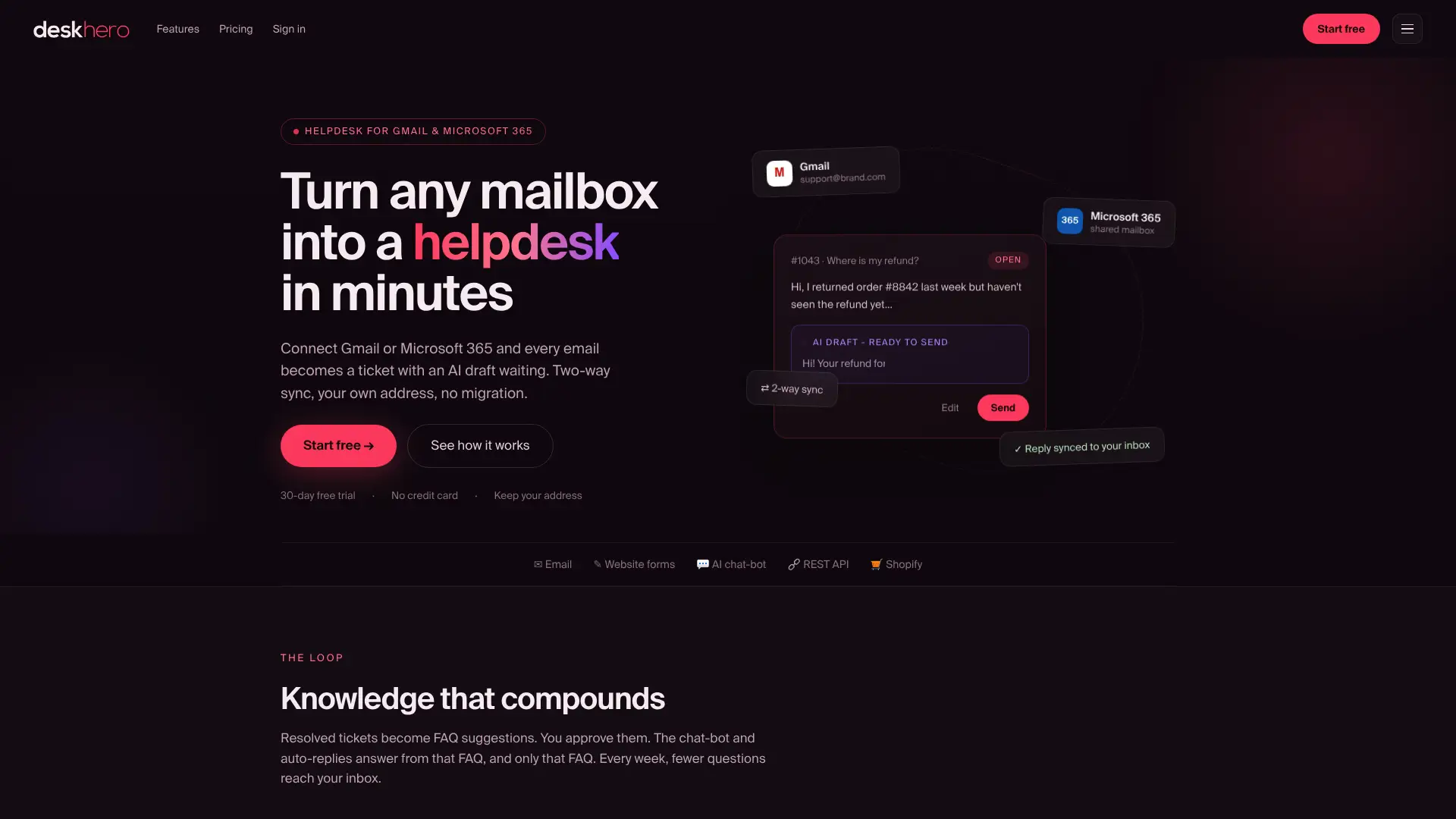
The AI chat-bot answers only from approved public FAQ items and requires at least 100 approved items before activation. AI auto-replies use the same approved FAQ boundary. Reply suggestions shown to Users can use the wider workspace knowledge pool and remain drafts for review.
During the 30-day trial, test mailbox synchronization, routing, permissions, reply suggestions, data export, automation rules, and the forms you plan to embed. If customer-facing AI is part of the plan, first confirm that you can build and maintain the required approved FAQ set.
Deskhero does not provide native voice, human live chat, a native mobile app, or a large catalog of packaged integrations. Teams that require those capabilities should compare a broader suite. Email-first teams can start a free trial and evaluate the workflow with their own mailbox.
Useful sources for further research
Use current vendor documentation and plan pages for final verification. Independent review collections can help identify questions to test, but vendor documentation should confirm features and packaging.
- Gartner Peer Insights Freshdesk Omni alternatives: A collection of user reviews and alternative products. Access may depend on the visitor's region or browser.
- Vendor product and pricing pages: Confirm current channel support, plan limits, AI charges, integrations, and trial terms for every shortlisted product.
- Deskhero product page: The primary public source for Deskhero's current positioning and trial entry point.
- Vendor migration documentation: Check supported import formats, attachment handling, field mapping, and export options before committing.
Deskhero publishes this article and is presented as an option for email-first teams. No claim is made that one product is best for every support organization.
FAQ
What is the best alternative to Freshdesk?
There is no universal best alternative. Deskhero is relevant to email-first teams that want to keep an existing Google or Microsoft mailbox. Zendesk and other broad suites suit organizations with more channels and operational complexity. Intercom is relevant to digital support teams, while HubSpot Service Hub is most compelling for HubSpot CRM users.
What are the top ticketing systems available today?
Common products to evaluate include Freshdesk, Zendesk, Zoho Desk, Help Scout, HubSpot Service Hub, LiveAgent, HappyFox, Intercom, and Deskhero. The useful shortlist depends on team size, channels, integrations, workflow complexity, and budget.
Is Zendesk better than Freshdesk?
Zendesk and Freshdesk are both broad customer service platforms. Which is better depends on the required channels, workflows, integrations, reporting, AI products, implementation effort, and total cost. Compare the plans you would actually buy with a shared requirements list.
Who is Zendesk's biggest competitor?
Zendesk competes with several products, including Freshdesk, Salesforce Service Cloud, Intercom, and other customer service suites. The closest competitor changes with the buyer's size, channels, and service-management requirements.
What should I test during a helpdesk free trial?
Test ticket intake, sending, routing, permissions, search, reporting, integrations, and export with realistic sample data. For AI, test both answerable and unsupported questions, inspect the sources used, and confirm the human handoff. Also model the expected subscription and usage charges.