7 Missive Alternatives for Support Teams to Test

If you need Missive alternatives for customer support, compare Deskhero, Front, and Gmelius first. Deskhero adds ticketing, SLA policies, Statistics, and AI-assisted replies to Gmail or Microsoft 365 mailboxes. Front combines shared inboxes, ticketing, automation, and analytics. Gmelius adds shared inboxes, assignment, automation, SLA tools, and analytics inside Gmail.
The broader shortlist of Missive alternatives breaks down like this:
- Deskhero: a helpdesk for existing Gmail and Microsoft 365 mailboxes, with two-way email sync, ticketing, SLA policies, Statistics, AI-assisted replies, and Shopify support
- Front: a shared inbox and ticketing platform with automation, analytics, and optional AI products
- Gmelius: Gmail-native shared inboxes, labels, assignments, automation, SLA tools, and email analytics
- Superhuman: a fast email client with AI and team collaboration features, but not a support ticketing system
- Shortwave: an AI-focused email client with shared threads, comments, assignees, and shared labels
- Spark Mail: a cross-platform email client with shared drafts, comments, threads, and assignments
- Fyxer: an AI email assistant for Gmail and Outlook that organizes inboxes and drafts replies in the user's voice
These products solve different problems. Some replace the email client, some add collaboration inside Gmail, and others provide a ticket-based support workflow. Pick the operating model before comparing feature lists. You can test Deskhero on an existing mailbox before committing.
Key Takeaways
Deskhero, Front, and Gmelius are the most directly relevant options for teams that need shared ownership of customer email. Deskhero is the ticket-first choice for Gmail and Microsoft 365 teams, Front suits teams that want a broad customer support platform, and Gmelius is the most Gmail-native of the three.
| Point | Details |
|---|---|
| Choose the operating model first | Email clients, Gmail-native collaboration tools, and helpdesks structure work differently. Choose the category before the product. |
| Formal support workflows favor ticketing | If you need ticket status, ownership, SLA policies, and response-time reporting, focus on Deskhero or Front. |
| Gmail-native options reduce workflow change | Gmelius works inside Gmail and adds shared inboxes, assignments, automation, SLA tools, and analytics. |
| AI uses different knowledge sources | Deskhero's suggested replies use all workspace knowledge. Its customer-facing chatbot and AI auto-replies use only the approved public FAQ. |
| Run a real pilot | Connect one low-volume mailbox, test assignment and replies, and review reporting before moving the rest of the team. |
Table of Contents
- Which Missive alternatives win on the features that actually matter?
- Short profiles: what each tool is actually built for
- How should you compare the cost of switching from Missive?
- How to migrate from Missive without losing a week of productivity
- How to choose the right tool for your team
- How this comparison was built
- Why Deskhero stands out for teams that need a helpdesk overlay
- When the inbox model stops working and the helpdesk model starts
- Deskhero turns your existing mailbox into a full support system
- Sources
- FAQ
Which Missive alternatives win on the features that actually matter?
The useful comparison is not a single winner. It is how closely each tool matches your team's main job.
| Tool | Best fit | Shared ownership | Support reporting | Email environment |
|---|---|---|---|---|
| Deskhero | Ticket-based customer support | Ticket groups and assignees | Statistics and SLA reporting | Gmail, Google Workspace, Microsoft 365, and configured domain mailboxes |
| Front | Omnichannel customer support | Shared inboxes and assignments | Basic to advanced analytics by plan | Email plus additional channels on higher plans |
| Gmelius | Collaboration inside Gmail | Shared inboxes, labels, and auto-assignment | SLA and email analytics on Growth | Gmail and Google Workspace |
| Superhuman | Fast individual and team email | Team collaboration features | Team analytics vary by offering | Gmail and Outlook accounts |
| Shortwave | AI-assisted email productivity | Shared threads, comments, assignees, and labels | No formal helpdesk SLA reporting listed | Gmail and Google Workspace |
| Spark Mail | Collaborative email drafting and delegation | Shared threads, drafts, comments, and assignments | No formal helpdesk SLA reporting listed | Multiple email account providers |
| Fyxer | AI inbox organization and drafting | Team plans and centralized administration | Not positioned as helpdesk reporting | Gmail and Outlook |
Pro Tip: Send a real message to a pilot mailbox and confirm ownership, send-from behavior, reporting, and the customer-visible reply before making a decision.
Short profiles: what each tool is actually built for
Deskhero
Deskhero turns inbound email, embedded forms, and chatbot conversations into tickets. Gmail and Microsoft 365 connections support two-way synchronization, so replies can be sent from the connected company address. Teams work from a shared ticket queue with status, priority, group, assignee, tags, custom fields, SLA policies, and Statistics.
- Best for: Small and mid-sized support teams using Gmail or Microsoft 365 that need structured ticketing and reporting
- Standout feature: Suggested replies grounded in workspace knowledge, with customer-facing chatbot and auto-reply answers restricted to the approved public FAQ
- Pricing shape: Monthly per-User pricing
- Migration friction: Connect an existing mailbox and keep the company address; configuration still needs to be tested before rollout
- Pro: SLA policies, Statistics, ticket workflows, translation, and a read-only Shopify customer panel are included on paid plans
- Con: No native mobile app and no mobile-optimized web interface
Missive (baseline)
Missive's official pricing page lists team inboxes, conversations, tasks, internal threads, collaborative drafting, assignments, chat, rules, analytics, and AI options. Its AI documentation describes support for multiple AI providers.
- Best for: Teams that want email, internal discussion, tasks, and collaboration in one client
- Standout feature: Real-time collaborative drafting and internal discussion around conversations
- Pricing shape: Per User, with monthly or annual billing
- Migration friction: Depends on the destination and how many rules, inboxes, and integrations must be rebuilt
- Pro: Strong collaboration across email and other communication channels
- Con: Teams that need a ticket-first helpdesk should confirm that Missive's workflow and reporting match their SLA process
Front
Front's official pricing page lists shared inboxes, ticketing, automation, analytics, a knowledge base, multiple channels, and optional AI products. Channel coverage, reporting, and included AI tools vary by offering.
- Best for: Support and operations teams that need broad channel coverage, automation, and reporting
- Standout feature: Shared inbox collaboration combined with formal ticketing and customer support workflows
- Pricing shape: Per User, with annual billing and optional AI add-ons
- Migration friction: Moderate when workflows, channels, and rules need to be recreated
- Pro: Clear upgrade path from shared inboxes to advanced reporting and omnichannel service
- Con: Professional pricing and AI add-ons can materially raise the cost for a larger team
Gmelius
Gmelius's official pricing page lists shared inboxes and labels, automation rules, auto-assignment, shared email templates, SLA tools, and email analytics for Gmail and Google Workspace.
- Best for: Google Workspace teams that want collaboration without changing email clients
- Standout feature: Shared inbox workflows inside Gmail
- Pricing shape: Per user, with monthly or annual billing
- Migration friction: Low for Gmail teams, though shared addresses and workflow rules still require setup
- Pro: Shared inboxes, assignments, automation, SLA tools, and analytics are available
- Con: The generally available product remains centered on Gmail and Google Workspace
Superhuman
Superhuman's official Mail page lists email productivity, AI, calendar and scheduling tools, and team collaboration. It is presented as an email productivity product rather than a ticketing helpdesk.
- Best for: Individuals and teams that prioritize fast email processing
- Standout feature: Keyboard-driven email workflows and built-in AI
- Pricing shape: Per member, with annual discounts
- Migration friction: Low for email-client adoption, but it does not reproduce a ticket lifecycle
- Con: Formal support queues, SLA policies, and ticket reporting are not its core use case
Shortwave
Shortwave's official pricing page lists AI search, summaries, attachment analysis, filters, shared threads, team comments, assignees, and shared labels. It is presented as a Gmail productivity product rather than a formal helpdesk.
- Best for: Gmail teams that want AI search, summaries, organization, and lightweight ownership
- Standout feature: AI-assisted search and inbox organization
- Pricing shape: Per User
- Migration friction: Low for Gmail users
- Con: No formal SLA policy or helpdesk reporting is listed on the pricing page
Spark Mail
Spark's official team pricing page lists email productivity, shared threads, private comments, shared drafts, assignments, and AI features. It also offers an individual option.
- Best for: Small teams that collaborate on drafts and delegate email work
- Standout feature: Real-time shared drafts with team discussion
- Pricing shape: Individual and team options with monthly or annual billing
- Migration friction: Low for teams adopting it as their email client
- Con: It is not positioned as a support ticketing and SLA platform
Fyxer
Fyxer's official pricing page lists Gmail and Outlook support, inbox organization, reply drafting, meeting notes, scheduling, and integrations. Its documentation also explains how uploaded files give drafts more context. Fyxer drafts messages for User review.
- Best for: Individuals and teams that want AI organization, drafting, and meeting support
- Standout feature: Reply drafts personalized from the user's communication patterns
- Pricing shape: Per user, with monthly and annual billing
- Con: Not a shared ticket queue or helpdesk platform
Pro Tip: Compare one ticket-first product with one inbox-first product. The difference in ownership, reporting, and daily work will be clearer than a checklist alone.
How should you compare the cost of switching from Missive?
Public prices do not show the full cost of a switch. Compare the billing model with the workflow, reporting, setup, and AI features your team needs. Verify every quote with the vendor before purchasing.
| Tool | Pricing model | Cost factors to check | Official source |
|---|---|---|---|
| Deskhero | Per User, billed monthly | Mailbox and usage needs | Deskhero pricing |
| Missive | Per User | Features, billing term, and connected accounts | Missive pricing |
| Front | Per User | Channels, reporting, and AI options | Front pricing |
| Gmelius | Per User | Gmail workflow, analytics, and AI options | Gmelius pricing |
| Superhuman | Per member | Team administration and collaboration needs | Superhuman Mail pricing |
| Shortwave | Per User | AI usage and Gmail collaboration needs | Shortwave pricing |
| Spark Mail | Per User | Team collaboration and AI features | Spark team pricing |
| Fyxer | Per User | Inbox, calendar, meeting, and onboarding needs | Fyxer pricing |
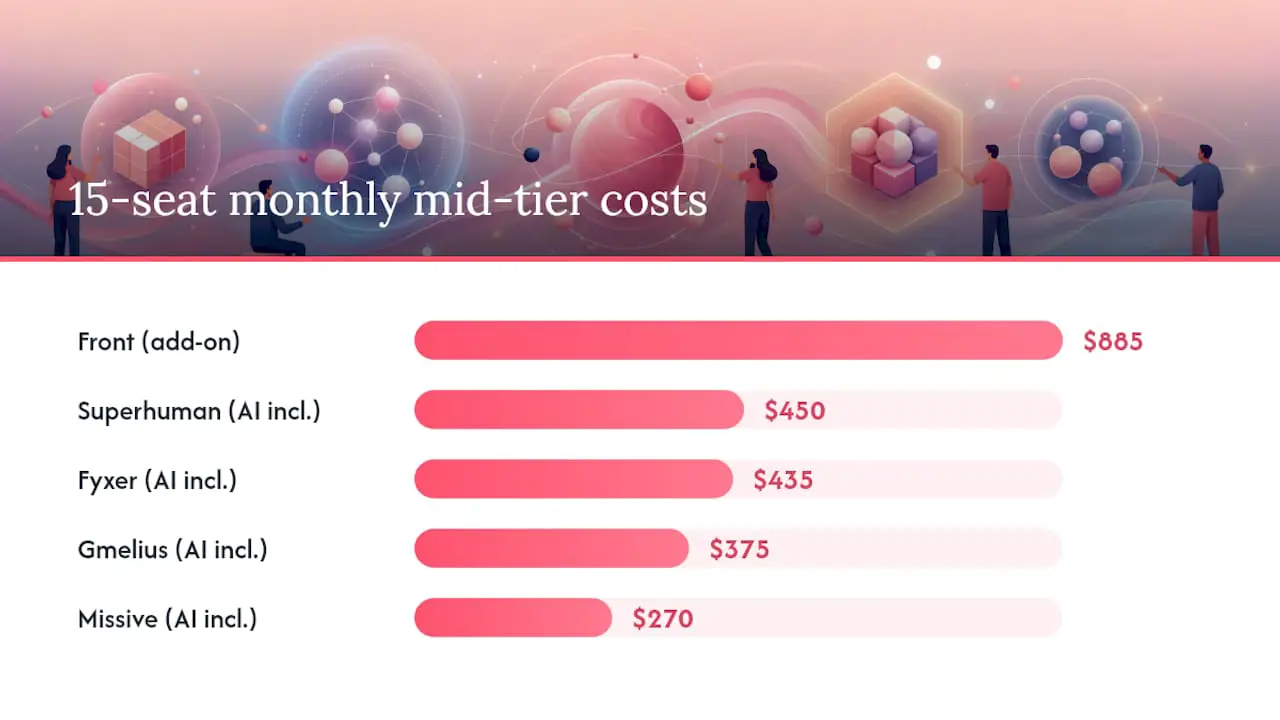
The lowest list price is not automatically the lowest deployment cost. Include setup time, workflow design, reporting, and any optional AI tools in the comparison.
Pro Tip: Ask how User changes affect billing, which AI features are included, and whether your required reporting is available.
How to migrate from Missive without losing a week of productivity
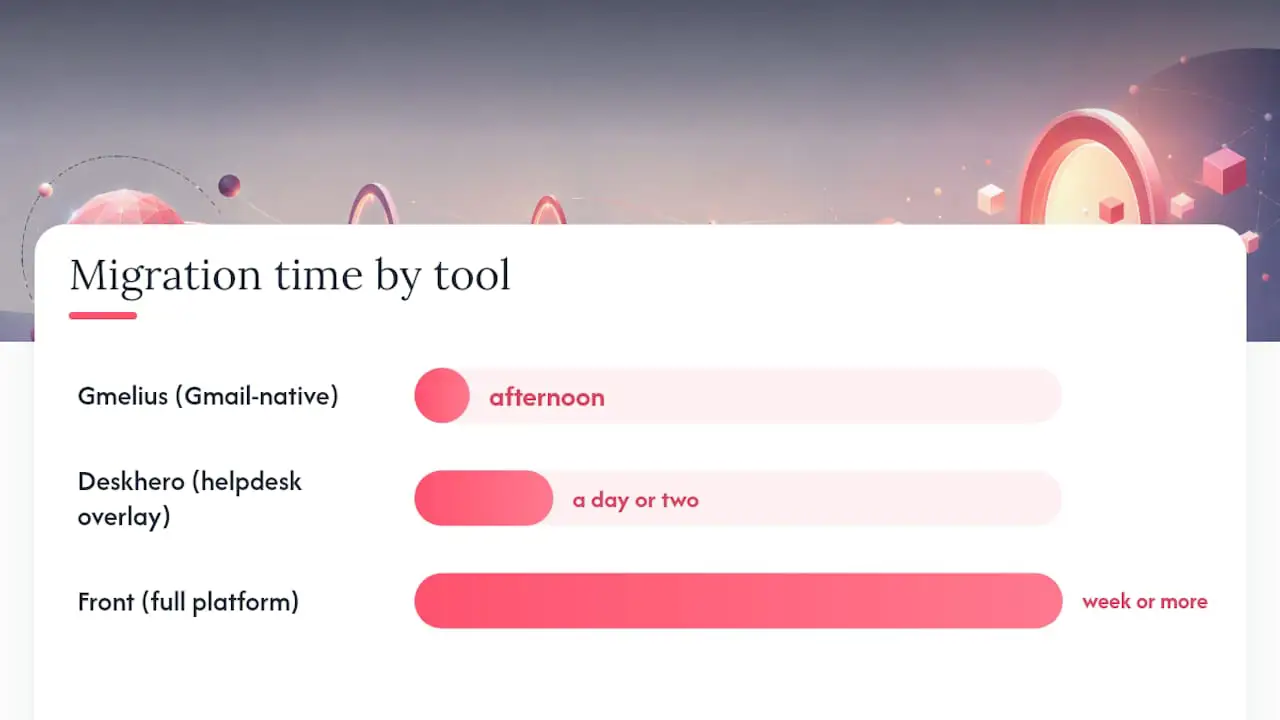
Migration effort depends on your mailboxes, channels, rules, integrations, and reporting needs. Do not assume that a Gmail extension, a new email client, and a ticketing platform require the same work.
- Inventory mailboxes and channels. List each shared address, connected account, social channel, and team inbox.
- Document rules and ownership. Record automations, assignments, labels, tasks, signatures, and exceptions that the new system must reproduce.
- Define the target workflow. Decide whether incoming work stays as conversations or becomes tickets with statuses, priorities, groups, assignees, and SLA policies.
- Configure one pilot mailbox. Connect or route a low-volume address and test inbound messages, outbound replies, threading, and the visible send-from address.
- Test real scenarios. Include assignment, handoff, attachments, customer replies, reporting, and any AI-assisted drafting your team plans to use.
- Train Users on the new workflow. Show where new work appears, how ownership changes, and how completed work is recorded.
- Move in stages. Expand only after the pilot has produced reliable replies, routing, and reporting.
A simple setup may take hours, while a multi-channel operation with extensive rules can take considerably longer. Ask each vendor what can be imported and what must be rebuilt manually.
For Microsoft 365 teams, Deskhero provides a shared mailbox access setup guide. Confirm permissions with your Microsoft 365 administrator before the pilot.
Pro Tip: Keep the pilot narrow enough to diagnose problems. One mailbox, a small User group, and a written test list will reveal more than a rushed company-wide cutover.
How to choose the right tool for your team
The decision usually comes down to three questions: Do you need a formal ticket lifecycle? Must the product stay inside Gmail? How much reporting and workflow control does the team require?
Must-have criteria by team type:
- Support teams: Shared ownership, ticket or conversation status, response-time reporting, SLA controls if required, auditability, and reliable send-from behavior
- Operations teams: Automation, integrations, assignments, comments, shared drafts, and exportable reporting
- Small collaborative teams: Shared drafts, comments, multi-account support, and a low learning curve
Questions to ask vendors:
- Does a reply come from our connected company address?
- Which knowledge sources does each AI feature use?
- Does the selected offering include the reporting, SLA, security, and administration features we need?
- What can be imported from Missive, and what must be rebuilt?
- Does the product have a native mobile app, a responsive web app, or neither?
Red flags to stop an evaluation:
- The vendor cannot explain send-from behavior for your mailbox type
- The quoted offering omits a required administration or reporting feature
- AI-generated content cannot be reviewed or disabled for the intended workflow
- The team must commit before it can test its real mailbox configuration
- The vendor cannot explain data export and account closure
For Deskhero, the public product site summarizes its mailbox-first helpdesk approach and trial terms.
How this comparison was built
Feature and pricing details were checked against official vendor product, documentation, and pricing pages during this update. Deskhero features were checked against its current product capabilities. Features and prices can change, so verify the final offering with each vendor before purchasing.
Primary source types used:
- Official vendor pricing pages for all seven alternatives and Missive
- Official product and documentation pages for collaboration, AI, reporting, and email-provider support
- Deskhero's current product capabilities for Deskhero-specific claims
Why Deskhero stands out for teams that need a helpdesk overlay
Missive is organized around email conversations and collaboration. Deskhero is organized around tickets. Each ticket has a status, priority, group, assignee, tags, and a chronological conversation and event timeline. SLA policies and Statistics add operational structure for teams that need to measure response and resolution performance.
Deskhero separates its AI knowledge rules by feature. Suggested replies use all workspace knowledge, including answered tickets, internal knowledge, approved public FAQ items, scraped website pages, imported material, and Shopify product data when connected. The customer-facing chatbot and AI auto-replies are more restricted and answer only from the approved public FAQ. The chatbot can be enabled after the workspace meets its approved FAQ readiness requirement.
Pro Tip: If you use Shopify, connect it during the pilot and verify the customer, order, fulfillment, and product information your Users need. The integration is read-only.
Start a Deskhero trial with this practical pilot checklist:
- Connect one shared mailbox
- Send representative customer messages through the queue
- Test ticket assignment, status changes, and outbound replies
- Review AI suggestions against the knowledge sources they cite
- Configure an SLA policy if your team uses response targets
- Invite a small User group and confirm permissions and handoffs
When the inbox model stops working and the helpdesk model starts
Team size alone does not determine whether you need a helpdesk. The better dividing line is whether customer conversations require a formal lifecycle and measurable accountability.
Inbox-first tools are a good fit when the main job is reading, drafting, discussing, and delegating email. They keep the workflow familiar and can be quick to adopt. Ticket-first tools become more useful when the team needs statuses, priorities, ownership, SLA policies, repeatable queues, and structured reporting.
The decision table to use:
| Business signal | Recommended architecture |
|---|---|
| Need formal SLA policies and ticket reporting | Ticket-first helpdesk |
| Team wants to stay entirely inside Gmail | Gmail-native collaboration tool |
| Primary use is drafting and internal coordination | Collaborative email client |
| Shopify customer and order context is needed in tickets | Helpdesk with a verified Shopify integration |
| AI must answer customers only from approved content | Product with a documented customer-facing knowledge boundary |
You do not have to make this decision from a feature matrix. A controlled pilot on one mailbox will show whether your team benefits from a ticket queue or prefers an inbox-centered workflow.
Deskhero turns your existing mailbox into a full support system
Deskhero connects to Gmail, Google Workspace, or Microsoft 365 mailboxes and turns incoming conversations into tickets. Two-way synchronization lets Users work in Deskhero while replies are sent from the connected company address. Mailboxes created through a custom domain use a separate DNS and forwarding setup.
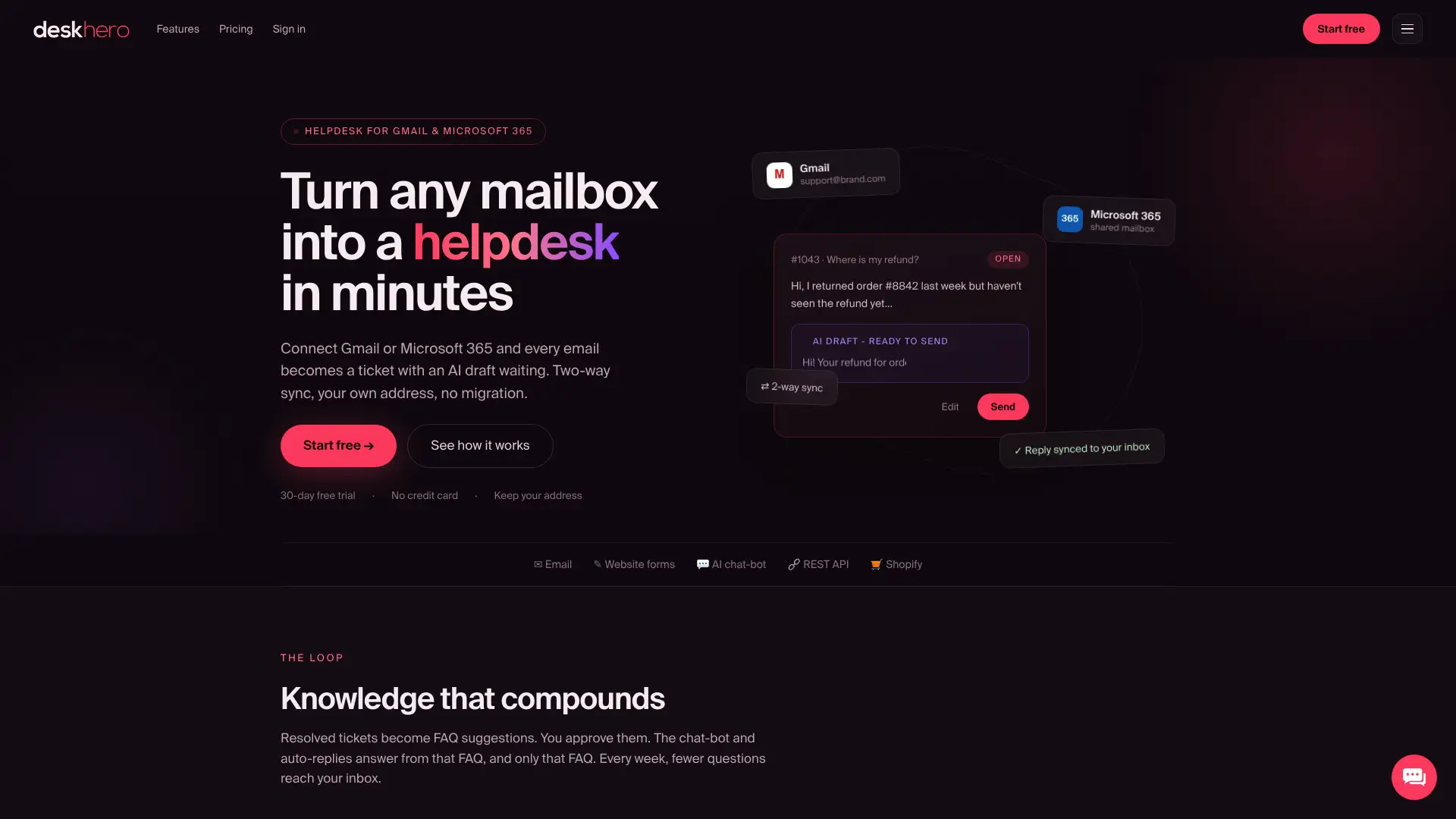
Suggested replies draw from workspace knowledge and remain under User control. The Shopify panel can show live customer, order, fulfillment, and product details when connected. The interface supports multiple languages, and Users can translate tickets and drafts across the platform language set. Deskhero includes SLA policies and the fixed-tab Statistics reporting area.
Start with Deskhero: connect one mailbox, invite a small User group, and test ticket handling with representative customer messages.
Sources
Check the official sources directly before making a purchase:
- Deskhero pricing
- Missive pricing
- Front pricing
- Gmelius pricing
- Superhuman Mail plans
- Shortwave pricing
- Spark team pricing
- Fyxer pricing
FAQ
What is the best Missive alternative for a small support team?
For a team that needs ticket status, assignees, SLA policies, reporting, and AI-assisted drafts while keeping a Gmail or Microsoft 365 address, Deskhero is a relevant option to test. Gmelius is a stronger fit when the priority is staying inside Gmail, while Front suits teams that need a broader customer support platform.
Does switching from Missive require a new email address?
Not necessarily. Deskhero connects to existing Gmail and Microsoft 365 mailboxes, and Gmelius works with Gmail and Google Workspace accounts. Confirm send-from behavior and mailbox permissions during the pilot.
Which Missive alternative has the best SLA tracking?
Deskhero and Front both provide formal SLA capabilities, while Gmelius lists SLA and email analytics. The best fit depends on whether you also need ticketing, multiple channels, or a Gmail-native workflow.
Are there free Missive alternatives?
Some products offer individual free options or trials. Check whether the evaluation includes the shared workflow and reporting you need, then compare it with the paid option you would use.
How long does it take to migrate from Missive?
There is no reliable universal estimate. A simple mailbox pilot can be quick, while a rollout involving many inboxes, rules, channels, integrations, and reporting requirements takes longer. Inventory the current setup and ask vendors what can be imported before scheduling the cutover.